

You’ve hit your search limit
Start your free trial to keep exploring full traffic and performance insights.
Get Started25 Nisaniçin Miracast for Screen Mirroring uygulama analizi

Miracast for Screen Mirroring
- BoostVision
- Google Play Store
- BOŞTA
- Araçlar
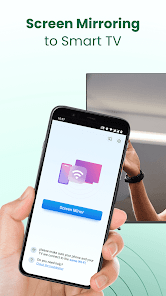
Do you feel tired from staring down at your phone screen for a long time? Go beyond the limits of your small screen with Miracast for Screen Mirroring and save your eyes and cervical spine now! With this practical screen cast app paired with our self-developed mirroring protocol, you can screen share your Android phone/tablet on the big screen of the smart TV built in with Miracast technology (or Mac) via WiFi faster & more stable!
This Miracast for Screen Mirroring app works perfectly with a wide range of smart TVs supporting Miracast protocol: Fire TV, LG, Roku, Samsung, Panasonic, TCL Roku, Hisense, Sony, Vizio, Apple TV, etc. It can work normally on Android mobile phones/tablets with Android 7.0+ stably.
Unique Features:
☆ Enjoy music, videos and play games on your large smart TV.
☆ Experience fast and stable screen sharing in mirroring with our self-developed mirror protocol.
☆ Screen mirroring your phone screens to smart TV built in with Miracast in real-time.
☆ Support choosing mirroring quality & adjusting volume.
☆ Simple & fast connection with just one tap over WiFi.
☆ Support for most media files, including videos, photos and audios.
What can you do with this Miracast for Screen Mirroring app?
☆ Screen mirroring from your phone/tablet to Smart TV with miracast built-in. No external tools needed.
☆ Screen share your precious travel photos and videos with your families on big display.
☆ Stream exciting movies & funny web videos to TV/Mac to enhance your visual experience.
☆ Mirror the real-time game screen to the big smart TV display/Mac to share fun game hour with friends.
☆ Screen share the presentations and documents on the big TV screen/Mac with your co-workers.
Simple steps to screen mirror your mobile on TV:
Make sure your smart TV and the phone/tablet are connected to the same network.
Make sure your smart TV supports Miracast protocol.
Enable Miracast Display on your TV.
To enable Miracast, start by accessing the TV’s network settings and locating the ""Screen Mirroring"" or ""Miracast"" option, and then switch it to ""on"".
Enable Wireless Dispaly option on your phone.
Choose your TV device name to connect with this miracast app.
All done. Enhance your visual experience now!
Troubleshoot:
• The screen mirroring app can only work when it is on the same WiFi as the smart TV/Mac.
• Smart TV must support Miracast protocol.
• Reinstalling this screen mirror app and rebooting the TV can fix most of the connecting issues.
• For connecting issues with mobile devices, try downloading the screen share app to another device.
DISCLAIMER:
Miracast for Screen Mirroring isn't affiliated with any of the TV brands above. And due to the limited number of device models we can test, our screen mirroring app can't be compatible with all TV models.
Terms of Use: https://www.boostvision.tv/terms-of-use
Privacy Policy: https://www.boostvision.tv/privacy-policy
Miracast for Screen Mirroring kullanım sırası
Kullanım sıralaması, Similarweb'in 28 günlük bir süre boyunca mevcut yüklemeleri ve aktif kullanıcıları hesaplayan algoritmasına dayanmaktadır.
Tüm kategoriler içinde
Brezilya#8,154
Araçlar içinde
Brezilya#1,382
Kullanıcıların İlgi Alanları & En İyi Kategoriler
0}Miracast for Screen Mirroring kullanıcıları tarafından kullanılan başlıca kategoriler ve uygulamalar
En Popüler Kategoriler
Yakın ilgi alanı
Kategorideki En Popüler Uygulamalar
Daha fazla uygulama
22%


11%


8%



8%


En İyi Rakipler & Alternatif Uygulamalar
Aynı mağazadan, aynı kullanıcılar tarafından kullanılma olasılığı yüksek olan uygulamalar.

Cast for Chromecast & TV Cast

Screen Mirroring: Phone to TV

Google Fi Wireless

Control+
Miracast for Screen Mirroring VS. Nisan 25, 2026