

You’ve hit your search limit
Start your free trial to keep exploring full traffic and performance insights.
Get Started31 Mayısiçin iVend POS uygulama analizi

iVend POS
- iVend
- Google Play Store
- BOŞTA
- İşletme
iVend Mobile POS gives complete Point of Sale functionality for iVend Retail 6.6 on Android Phones (4" and above) and Tablets (7", 8" and 10") running Android OS 5.0 and above. iVend Mobile POS is well suited for retail stores of all sizes. Retailers must be running iVend Retail 6.6 as their enterprise retail server to use iVend Mobile POS as a Point of Sale. iVend Mobile POS connects with iVend Server over WiFi or 3G/ 4G/ LTE in online mode but is also designed to work when there is no network connectivity on an offline mode.
iVend Mobile POS is the POS component for iVend Retail Suite that includes Terminal POS, Loyalty management system, eCommerce, mCommerce, Digital Passes and Business Intelligence. Retailers can run iVend Mobile POS independent of any ERP system. Larger retailers can use SAP certified integration for SAP ERP, SAP All-in-One or SAP Business One apart from any other ERP available to retailers. For more information, please visit https://www.ivend.com/
Users can evaluate iVend Mobile POS by downloading the app and run the demo system for a better understanding.
iVend Mobile POS supports the following hardware:
• Bluetooth Printer: Bixolon: SPP-R300i, Star: SM-S220i
• IDTECH Mobile Magstripe Reader - Shuttle
• IDTECH Mobile Magstripe Reader - BTMag
• Socket Mobile Scanner CHS 7XI (for Barcode Scanning)
• Device Camera (for barcode scanning)
Features:
Application Mode
• Online mode (network connectivity with iVend server): Sync live data for customer and transaction to iVend server and device database get updated on scheduled sync cycle.
• Offline mode (no network connectivity with iVend server): Data get sync on scheduled sync cycle if application becomes online on that time.
• Setup
• Fast Scanning Mode - To add items faster in transaction
• Default support of 5 Languages; user can also use his own language using language customization option
• Default Product add mode: Product List/Quick Button Panel/Barcode scanning
• Transaction receipt printing in 2 sizes of paper: 3" receipt and 2" receipt
• Default email settings for email templates
• Data Synchronization with iVend server: On specified time interval, on fixed time of the day or manually
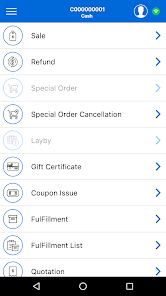
Transaction Modes
• Sale
• Refund
• Special Order
• Special Order Cancellation
• Layby
• Gift Certificate Sale
• Recall suspended transactions
• Add new customer
• Edit or view existing customer
• Search Customer on the basis of: Customer Code, Name, Phone Number or Customer Group
• Filter products on the basis of: Product Code, Description, UPC Code, Product Group and Product Category
Transaction Operations
• Add products by selecting from product list, by scanning barcode, by selecting from quick button panel
• Surcharges
• Price, discount, quantity and total by items
• Display sale level discount, subtotal, tax and net total
• Suspend transaction
• Void transaction
• Specify sale level sales person
• Apply sale level discount
• Apply coupon
• Apply surcharges at sale level
• Select loyalty id of customer
• Layby plan selection for layby transaction
Tender Types
• Cash
• Credit and Debit Card (only in online mode - gets verified by payment processor)
• Check
• On Account (only in Online mode - gets verified by iVend server)
• Gift Card (only in Online mode - gets verified by iVend server)
Transaction Complete
• Payment with multiple tenders
• Quick cash complete
• Display payable amount, paid amount and balance due
• Display user information
• Print transaction receipt
• Email transaction receipt
Preview Transaction
• List all transactions
• Delete suspended transaction by single swipe
• Preview selected transaction
• Recall suspended transactions
iVend POS kullanım sırası
Kullanım sıralaması, Similarweb'in 28 günlük bir süre boyunca mevcut yüklemeleri ve aktif kullanıcıları hesaplayan algoritmasına dayanmaktadır.
Tüm kategoriler içinde
Amerika Birleşik Devletleri--
İşletme içinde
Amerika Birleşik Devletleri--
Kullanıcıların İlgi Alanları & En İyi Kategoriler
0}iVend POS kullanıcıları tarafından kullanılan başlıca kategoriler ve uygulamalar
En Popüler Kategoriler
Yakın ilgi alanı
Kategorideki En Popüler Uygulamalar
Daha fazla uygulama
28%





21%





20%





14%


En İyi Rakipler & Alternatif Uygulamalar
Aynı mağazadan, aynı kullanıcılar tarafından kullanılma olasılığı yüksek olan uygulamalar.

 iVend POS VS.
 Mayıs 31, 2026