

You’ve hit your search limit
Start your free trial to keep exploring full traffic and performance insights.
Get Started26 Nisaniçin AnyMirror: Mirror Screen to PC uygulama analizi

AnyMirror: Mirror Screen to PC
- iMobie Inc.
- Google Play Store
- BOŞTA
- Araçlar
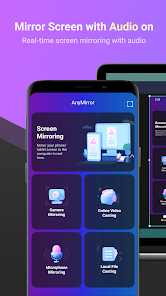
AnyMirror is an easy-to-use screen mirroring app that can be used to mirror your phone or tablet to the computer with audio via USB or Wi-Fi. You can mirror whatever is happening on your mobile device, display it on the computer with high resolution in real-time. AnyMirror also comes with tools to take screenshots, record live HD videos, or add annotations to take your mirrored content to the next level. In addition, AnyMirror allows you to mirror multiple devices simultaneously, which offers a wonderful visual experience for you.
Main Features
1. Use your phone as a webcam and mic
- AnyMirror enables you to mirror in high-definition and lossless quality, which presents your image more professional. Meanwhile, you can walk freely with a movable camera and microphone via Wi-Fi.
2. Manage and edit in any way you like
- Add, rotate, resize, show a separate window, and display smart layouts with AnyMirror in a few clicks. No longer limited by inflexible vertical screens anymore.
3. Augment mirrored content to engage with your audience
- Annotations are a practical way to emphasize details and clarify opinions. Used in conjunction with a screen capture or recording, to create an engaging video, you can be assured that your presentation will be more intuitive and vivid.
4. Stream to multiple destinations without delay
- Real-time stream the mirrored screen to applications like OBS Studio or Zoom for live streaming or meeting.
Use cases
Meeting
- AnyMirror bridges the communication gap in an online meeting, which enables the meeting attendees to communicate in high-definition and lossless quality. In addition, you can stand out from your colleagues by recording creative videos with AnyMirror before the meeting.
Teaching
- As a teacher, you can display courseware, files, and exercises with AnyMirror. It also enables you to annotate courseware or type down key points onto your phone/tablet and share the screen with the computer in real-time.
Live Streaming
- You can easily stream mirrored screens along with your image to live streaming apps with AnyMirror. In this way, you can show your excellent skills and performance when you are creating works or playing mobile games to your fans.
Demonstration
- With AnyMirror, you can produce videos of apps tutorials, save and share with your audience instantly. Annotate to emphasize important details when you are demonstrating, and let your audience quickly understand how your app works.
Entertainment
- Cast apps and files with ease. Play music, films, games, and share photos with your families on a larger screen. Make your spare time more fun.
How to Connect
Auto Detection:
1. Keep your device and computer connected to the same WI-Fi network.
2. Launch AnyMirror on your computer.
3. Drag and drop the computer icon to connect once it's automatically searched out.
QR Code Scan:
1. Keep your device and computer connected to the same Wi-Fi network.
2. Launch AnyMirror on the computer → Click Screen Mirroring/Camera Mirroring/Microphone Mirroring → Android → Wi-Fi → Scan QR Code.
USB Connection:
1. Launch AnyMirror on the computer. Connect your device to the computer with a USB cable.
2. Click Screen Mirroring/Camera Mirroring/Microphone Mirroring on AnyMirror desktop software, and follow USB Connection Guide.
AnyMirror: Mirror Screen to PC kullanım sırası
Kullanım sıralaması, Similarweb'in 28 günlük bir süre boyunca mevcut yüklemeleri ve aktif kullanıcıları hesaplayan algoritmasına dayanmaktadır.
Tüm kategoriler içinde
Amerika Birleşik Devletleri--
Araçlar içinde
Amerika Birleşik Devletleri--
En İyi Rakipler & Alternatif Uygulamalar
Aynı mağazadan, aynı kullanıcılar tarafından kullanılma olasılığı yüksek olan uygulamalar.
Remote Mouse

RealVNC Viewer: Remote Desktop

RICOH Smart Device Connector

nutrifitopia
 AnyMirror: Mirror Screen to PC VS.
 Nisan 26, 2026