

You’ve hit your search limit
Start your free trial to keep exploring full traffic and performance insights.
Get Started24 Nisaniçin Device Info: Check System, CPU uygulama analizi

Device Info: Check System, CPU
- ToraLabs
- Google Play Store
- BOŞTA
- Araçlar
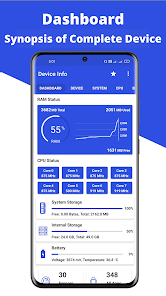
Device Info is a user-friendly Android application designed to provide complete and detailed information about your mobile device, featuring the best user interface available. This app is not only beneficial for casual users but also for developers working on kernels or Android apps. Packed with numerous features, Device Info offers extensive insights into both software and hardware aspects of your Android device, including CPU, RAM, OS, Sensors, Storage, Battery, SIM, Bluetooth, Installed Apps, System Apps, Display, Camera, Thermal, Codecs, Inputs, Mounted Storage, and CPU time-in-state.
Key Features:
Dashboard 📊
• Monitor essential parameters such as RAM, System Storage, Internal Storage, External Storage, Battery, CPU, available Sensors, and the total number of installed apps.
Device Details 📱
• Comprehensive information on:
• Device Name, Model, Manufacturer.
• Device ID, Type, Network Operator, WiFi MAC Address.
• Build Fingerprint, USB Host, Google Advertising ID.
• Timezone and Device Features.
System Information ⚙️
• Details about your system, including:
• Version, CodeName, API Level, Security Patch Level.
• Bootloader, Build Number, Baseband, Java VM.
• Kernel, Language, Root Access, Treble, Seamless Updates.
• Google Play Service Version, SELinux, System Uptime.
DRM Info 🔒
• Provides details on Widevine and Clearkey DRM systems:
• Widevine CDM: Vendor, Version, System ID, Security Level, Max HDCP Level.
• Clearkey CDM: Vendor, Version.
CPU Details 🧠
• In-depth CPU information, including:
• Processor, CPU Hardware, Supported ABIs, CPU Architecture, Cores, CPU Family, CPU Governor, Frequency, CPU Usage, BogoMIPS.
• Vulkan Support, GPU Renderer, GPU Version, GPU Vendor.
Battery Information 🔋
• Key battery metrics such as Health, Status, Current, Level, Voltage, Power Source, Technology, Temperature, Capacity.
Display Features 📺
• Comprehensive display details:
• Resolution, Density, Font Scale, Physical Size, Refresh Rate, HDR, Brightness Level, Screen Timeout, Orientation.
Memory 💾
• Insights into:
• RAM, Z-RAM, System Storage, Internal Storage, External Storage, RAM Type, Bandwidth.
Sensors 🧭
• Information on available sensors:
• Sensor Name, Sensor Vendor, Type, Power.
Apps 📦
• Details about installed apps:
• Package Name, Version, Target SDK, Minimum SDK, Size, UID, Permissions, Activities, App Icons.
• Option to extract apps and sort them by system and installed apps.
Camera Features 📷
• Extensive camera capabilities:
• Aberration Modes, Antibanding Modes, Auto Exposure Modes, Autofocus Modes, Effects, Scene Modes, Video Stabilization Modes, Auto White Balance Modes, Hardware Level, Camera Capabilities, Supported Resolutions.
Network Information 🌐
• Network details such as:
• BSSID, DHCP Server, DHCP Lease Duration, Gateway, Subnet Mask, DNS, IPv4 Address, IPv6 Address, Signal Strength, Link Speed, Frequency and Channels, Phone Type.
Device Tests ✅
• Perform various tests to check device functionality:
• Display, MultiTouch, Flashlight, Loudspeaker, Ear Speaker, Ear Proximity, Light Sensor, Accelerometer, Vibration, Bluetooth, Fingerprint, Volume Up Button, Volume Down Button.
Permissions Required 🔑
• Network/WiFi Access and Phone: To obtain network info.
• Camera: For flashlight test.
• Storage: To store exported data and extract apps.
Additional Information ℹ️
• Detailed insights on thermals, codecs, and input devices.
• Dark theme support with 15 color themes and 15 languages. All themes are free to choose.
• Data export feature to save all information in a text file.
• Widget that updates every 30 minutes.
• Minimal permissions required for smooth operation.
• Privacy Assurance: No data is collected or stored in any format.
© ToraLabs
Device Info: Check System, CPU kullanım sırası
Kullanım sıralaması, Similarweb'in 28 günlük bir süre boyunca mevcut yüklemeleri ve aktif kullanıcıları hesaplayan algoritmasına dayanmaktadır.
Tüm kategoriler içinde
Amerika Birleşik Devletleri--
Araçlar içinde
Amerika Birleşik Devletleri#6,949
Kullanıcıların İlgi Alanları & En İyi Kategoriler
0}Device Info: Check System, CPU kullanıcıları tarafından kullanılan başlıca kategoriler ve uygulamalar
En Popüler Kategoriler
Yakın ilgi alanı
Kategorideki En Popüler Uygulamalar
28%



22%



13%

11%


En İyi Rakipler & Alternatif Uygulamalar
Aynı mağazadan, aynı kullanıcılar tarafından kullanılma olasılığı yüksek olan uygulamalar.

UltData: Photo & Data Recovery

AT&T Personal Cloud
WhatisRemoved+
Charge Meter
 Device Info: Check System, CPU VS.
 Nisan 24, 2026