

2月21日 的 Music DJ 應用程式分析

Music DJ
- Liavante, LLC
- Apple App Store
- 免費版
- 音樂
Play your music like a professional DJ! Great for dance events , parties, weddings. Automates some of the most useful DJ tasks freeing you to enjoy the party.
Double Tap song to start playing immediately.
Swipe to quickly remove songs from your Playlist Queue.
Swipe to quickly add songs from your Music Library onto your Playlist Queue.
Customize the main screen with your own title (e.g. business, studio, dj name, etc) - Music DJ Pro only feature.
Voice-over Announcements - automate announcements at the beginning of a song. For example, you can announce the dance type (Waltz, Cha Cha) or wish someone a Happy Birthday. Announcements uses iOS’s text to speech synthesizer or you can pre-record your own voice announcement.
Set the maximum song duration and enable fade in/out settings.
Dynamically rearrange your playlist song order.
Crossfade between songs.
Adjust the song tempo.
Display songs lyrics (LRC simple format) during playback.
Customize the genre picker for quicker song selection based on your iTunes genre and star ratings.
Main Menu Items:
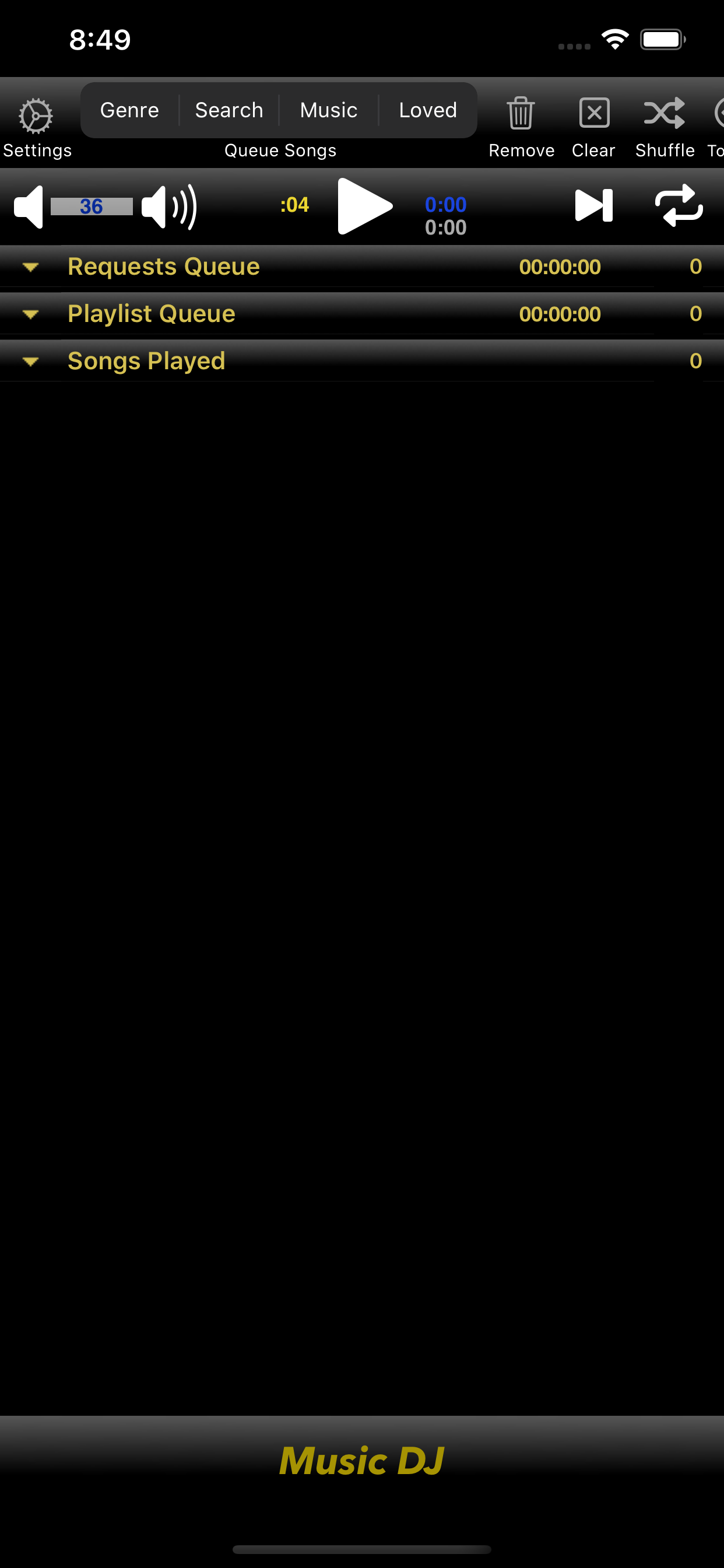
Settings Button: Player Settings – maximum song duration, control fading in/out, tempo, or add a time delay between songs.
Add Songs Buttons - add songs using the iPod music interface. Search songs by Title, Genre, or Artist. Quickly filter songs by Genre and your star rating.
Remove Button - selectively remove songs from the Requests, Playlist, or Songs Played list.
Clear Button - clear any or all of the three song list sections: Requests, Playlist, Songs Played.
Shuffle Button - randomly shuffles songs in your current playlist queued.
Simple Button - simplified player interface to control music playback. Tap screen to play/pause, swipe up/down to change volume, swipe right/left to move to the next/previous song in your playlist.
Lyrics Button - displays a songs lyrics from your music library during playback. Time Coded Lyrics are highlighted during playback. iTunes can be used to add song lyrics to songs in a users music library.
MDJ Playlist (Save, Edit, Queue) buttons - swipe the user controls left/right to see all buttons available.
Save: Save the current songs in Request, Playlist, or Songs Played queue to a MDJ Playlist for future use.
Edit: Make changes to saved MDJ Playlists.
Queue: Add songs from a saved MDJ Playlist to your current play queue.
Player Controls:
Volume - Tap or hold down the speaker symbols to change the volume level.
Play/Pause Button – actual song time & duration counters are displayed.
Play-Skip Button - skip to the next song in the playlist. Enable fade out for smooth transition to next song.
Repeat Button - Press to toggle off (button is white), repeat current song (button is blue with "1"), or repeat "Songs Played" list (button is blue) once the current "Playlist" songs have finished.
Three sections of Song Lists: 1 - Requests, 2 – Playlist, 3 - Songs Played
Scrollable list of songs you’ve selected from your music library. Each section shows the song count and can be hidden/displayed by tapping the section title. Dynamically dragged and dropped songs to change their order or move songs from one section to another. Add or remove songs during playback.
Requests list: you can hold user song request here then drag and drop them to your playlist order for playback. Drag songs from your Playlist of Songs Played list for later playback as well.
Playlist: Order of songs to be played. Drag and drop songs to rearrange the order.
Songs Played: List of songs already played. You can drag songs to your Playlist or Requests list.
Background Audio Play - your device music controls can be used when Music DJ is playing in the background. The next & previous song controls can be used to view songs in the current playlist or those recently played.
Note: Music DJ can play your downloaded non-protected (i.e. DRM free) music. Apple Music songs are DRM protected.
商店排名
商店排名基於Google和Apple設定的多個參數。
所有類別 在
巴西--
音樂 在
巴西--


 Music DJ VS.
 2月 21, 2026