

2月18日 的 Home Designer - Architecture 應用程式分析

Home Designer - Architecture
- Sebastian Kemper
- Google Play 商店
- 免費版
- 住宅與家庭
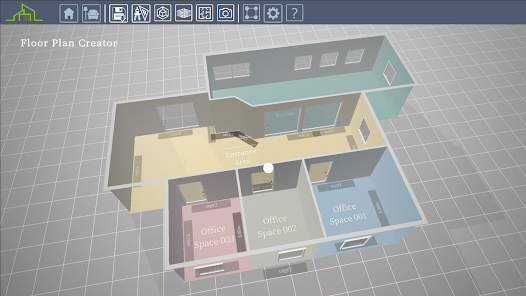
Would you like to create a 3D floor plan quickly and easily and maybe even set it up with modern furniture?
Then you have found exactly the right software with Home Designer - Architecture.
You can quickly create rooms and entire floor plans with just a few clicks. You can even import an image file as a template, where you may have already drawn a 2D floor plan, to redraw it in Home Designer - Architecture.
You can insert doors and windows and change their design and size.
Once your floor plan is complete, it's time for the interior design. Here you have over 1000 pieces of furniture that you can use to set up your 3D floor plan.
Once the interior design is finished, use the photo editor and the photo function to create dreamy pictures of your work.
1. CREATE YOUR 3D FLOOR PLAN
- Draw rooms in 2D or 3D
- Import a 2D drawing as a template
- Change the height of the room and the thickness of the walls (inside and outside)
- Create doors and windows (fully configurable)
- Use the photo function to record your floor plan from different perspectives
2. INTERIOR DESIGN
- Use over 1000 different furniture and accessories and decorate your 3D floor plan
- Furniture can also be resized
- Use numerous wall colors and floor designs
- Use image editing to make your result even more realistic
- Use the photo function to capture and share your design
I wish you a lot of fun with Home Designer - Architecture!
Home Designer - Architecture 使用排名
基於 Similarweb 的算法,根據過去 28 天的安裝數和活躍用戶數進行計算。
所有類別 在
美國--
住宅與家庭 在
美國--






 Home Designer - Architecture VS.
 2月 18, 2026