

4月22日 的 Memo Widget (to-dos&ideas) 應用程式分析
Memo Widget (to-dos&ideas)
- TheDayBefore, Inc.
- Google Play 商店
- 免費版
- 生活方式
Looking for an easy-to-use and customizable memo app?
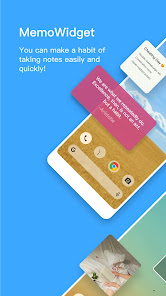
With MemoWidget, you can easily create and display memos on your phone.
Try MemoWidget to remind yourself of important events or just to decorate your personal home screen.
Main features:
- Powerful Memo Widget
- To-do Task Management
- Synchronize Memos(Premium)
- Passcode function(Premium)
- Memo shown on Status bar
- Color Settings by Memo
- Color Group
Widget size Options
1x1, 2x1, 2x2, 4x1, 4x2, 4x4, 5x1, 5x2, 5x5 and adjustable size
Customization Options
Text size & color, background color, border color
transparent background, text-shadow
Bold, italic, underline
Text alignment (left, right, vertical (upper, center, lower))
MemoWidget Premium
Upgrade to premium subscription and try all premium services.
(Synchronization, removing ads, passcode function, Various background photos & pattern images, and Upload a photo to a memo.)
Synchronize Memos(Premium)
Start synchronizing and keep memos safe.
Passcode function(Premium)
Set the password so that no one else can see it.
Upload a photo to a memo(Premium)
You can upload pictures.
Up to 10 pictures in one memo.
Note
Install on SD card does not work properly. Be sure to install it in the internal memory.
Selective Privilege Guidance
Storage: Used for backing up and recovering memos.
How to display memo on home screen
Home Screen > Press and hold onto screen > Widgets > MemoWidget
Memo Widget (to-dos&ideas) 使用排名
基於 Similarweb 的算法,根據過去 28 天的安裝數和活躍用戶數進行計算。
所有類別 在
美國--
生活方式 在
美國#698
用戶興趣和熱門類別
Memo Widget (to-dos&ideas)用戶使用的熱門類別和應用程式
















 Memo Widget (to-dos&ideas) VS.
 4月 22, 2026