

5月3日 的 Alexa Echo Setup - All in one 應用程式分析

Alexa Echo Setup - All in one
- E-Echo IT services
- Google Play 商店
- 免費版
- 生活方式
Alexa Echo App now on your Android or iOS phone to setup Alexa-enabled devices like Echo, Echo Plus, Echo Dot, Echo Spot, Echo Sub, Echo Show, Echo Input, and Tap. This is not an official amazon Alexa app. This app is created for the purpose to guide how to setup alexa enabled devices like echo, echo dot etc.
For smooth and easy Alexa setup- you may refer the steps given in guide & enjoy listening to music, news updates, creating shopping lists, and much more, later.
How to Setup Alexa App and Echo Device? - Know Your Steps!
Get started with the steps for setup:
Step 1: Plug-in Alexa Device
Plug-in one end of USB cable in Echo power port and another end in power adapter.
Insert your power adapter in electric socket and switch on the plug.
Once Echo device receives power, check for the blue light ring on device top.
The light ring will change automatically to orange implying, the device has entered setup mode.
Step 2: Download Alexa App
Android users may refer Google Play store while iOS users can access App Store to download Alexa App.
Open the store i.e., compatible with your phone.
Type and Download Alexa App on your mobile device.
Follow on-screen instructions to complete Alexa App installation on your mobile.
You’ll see ‘Alexa App Install complete’ message after the process finishes successfully.
Step 3: Alexa App Setup
Touch Alexa App icon on your mobile to launch the program.
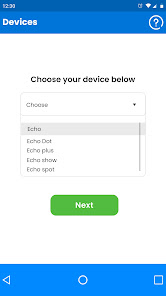
Tap on ‘Choose Your Device’ drop-down box and make your choice from the list (i.e., Echo, Echo Dot, Echo Plus, Echo Spot, Echo Show, Echo Sub, Echo Input, or Tap).
Note: You can setup one device at a time. For more than one Echo device setup, repeat the process from Step 3.
After you select the device from the given options, choose your location and language.
For instance, if you purchased your Echo Device from U.S. Amazon Account- your setting will be U.S. (English).
Alexa Echo Setup - All in one 使用排名
基於 Similarweb 的算法,根據過去 28 天的安裝數和活躍用戶數進行計算。
所有類別 在
美國--
生活方式 在
美國--












 Alexa Echo Setup - All in one VS.
 5月 3, 2026