

4月24日 的 Move to iOS 應用程式分析

Move to iOS
- Apple
- Google Play 商店
- 免費版
- 工具
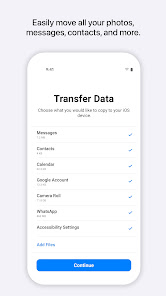
Everything about iOS is designed to be easy. That includes switching to it. With just a few steps, you can migrate your content automatically and securely from your Android device with the Move to iOS app. No need to save your stuff elsewhere before switching from Android. The Move to iOS app securely transfers all kinds of content data for you:
Apps
Calendars
Call logs
Contacts
Camera photos and videos
Mail accounts
Message history
Voice memos
WhatsApp content
Make sure to keep your devices nearby and connected to power until the transfer is complete. When you choose to migrate your data, your new iPhone or iPad will create a private Wi-Fi network and find your nearby Android device running Move to iOS. After you enter a security code, it will begin transferring your content and put it in the right places. Just like that. Once your content has been transferred, you’re ready to get going. That’s it — you can start using your new iPhone or iPad and experiencing its endless possibilities. Enjoy.
Required App Permission
Location: To establish a Wi-Fi connection between the Android device and the iPhone or iPad, which is needed to migrate the data.
Optional App Permission
- SMS: To migrate your text messages, including multi-media messages and group chats, on iPhone or iPad.
- Photos and Videos: To migrate your photos, videos, and related metadata to iPhone or iPad.
- Notifications: To allow local Android notifications about the status of your migration to iPhone or iPad.
- Contacts: To migrate your contacts to iPhone or iPad.
- Music and Audio: To migrate your downloaded media, audio recordings, and voice memos to iPhone or iPad.
- Phone: To migrate your SIM and carrier information so you can make and manage phone calls on iPhone or iPad.
- Calendar: To migrate your calendar events to iPhone or iPad.
- Call Logs: To migrate your call history to iPhone or iPad.
You can use Move to iOS even without providing consent to any of the above optional app permissions. However, some features of the service may not be available.
Move to iOS 使用排名
基於 Similarweb 的算法,根據過去 28 天的安裝數和活躍用戶數進行計算。
所有類別 在
美國#2,322
工具 在
美國#270
用戶興趣和熱門類別
Move to iOS用戶使用的熱門類別和應用程式














 Move to iOS VS.
 4月 24, 2026