

4月20日 的 AudioRec - Voice Recorder 應用程式分析

AudioRec - Voice Recorder
- AC SmartStudio
- Google Play 商店
- 免費版
- 音樂與音訊
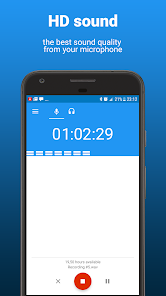
AudioRec - Voice Recorder is the best voice recorder for recording voice & sound at the highest recording quality from all android apps.
This audio recorder has a very intuitive interface and it is very easy to use while allowing both audio recording and audio playback.
You can make the audio recording sound louder by increasing the mic gain, you can record in stereo mode if your phone has 2 microphones, you can select between 8 kHz - 48 kHz sample rate, you can easily save the recordings into the external SD card, and much more, all for free. Also, you can rename and share your voice recordings to your friends.
This audio recorder is the perfect choice if you are a musician and want to record your classes, your concerts, or you just want to record a simple voice memo. Others are using it as a voice recorder for taking interviews, others are using it as a voice recorder to record snoring in the night :). Just give it a try, you will have your own home audio recording equipment inside your pocket ;).
NOTE:
This audio recorder IS NOT A CALL RECORDER, so it can't record phone conversations.
Functionality:
- WAV - PCM, 3GPP - AMR and MP4 - AAC formats supported
- Audio recording in background (even with display off)
- Start/Pause/Resume/Abort recording options
- Option to append(continue) an existing audio recording (only for WAV files)
- Mono and stereo recording (for devices that supports stereo recording)
- Gain (you can adjust the microphone's volume so it can record louder) - only for WAVE/PCM format
- Supported sample rates: 8 kHz, 11 kHz, 16 kHz, 22 kHz, 32 kHz, 44.1 kHz, 48 kHz
- It can record using the microphone used by the camera (rear mic) for a clearer and louder sound (if your phone has this microphone)
- It is possible to use custom folder for the recordings (even on external SD card)
- Option to auto-upload on cloud services like DropBox or Google Drive
- Each record file can be renamed, shared, set as ringtone, deleted.
- Recordings can be named using the current time as name or you can choose a custom one
- Recording & playback can be controlled using the notification buttons (for android 4.1+)
- Audio recorder can be controlled using home widget and lockScreen widget (for supported devices)
- Playback loop feature
SUPPORT
e-mail: circus.alexandru@gmail.com
Google+: https://plus.google.com/communities/105031026853687054852
If you would like to receive updates with new features and bug fixes a lot faster, you can join to the AudioRec community on Google+ and become a beta tester.
If you encounter any problem with this audio recorder, you can write an e-mail or you can post your feedback in AudioRec community on Google+.
If you want to help translating AudioRec Voice Recorder into your native language, please contact me at circus.alexandru@gmail.com.
Permission details
Record audio - audio record from microphone
Modify system settings - used to set a recording as the ringtone
Write to external storage - write recordings to external storage
Read from external storage - read recordings from external storage
Prevent phone from sleeping - allow background recording
Network access - used by the ads
Network state - used by the ads
AudioRec - Voice Recorder 使用排名
基於 Similarweb 的算法,根據過去 28 天的安裝數和活躍用戶數進行計算。
所有類別 在
德國#4,028
音樂與音訊 在
德國#184
用戶興趣和熱門類別
AudioRec - Voice Recorder用戶使用的熱門類別和應用程式


















 AudioRec - Voice Recorder VS.
 4月 20, 2026