

2月23日 的 Air-Share 應用程式分析

Air-Share
- BlackSpruce
- Google Play 商店
- 免費版
- 工具
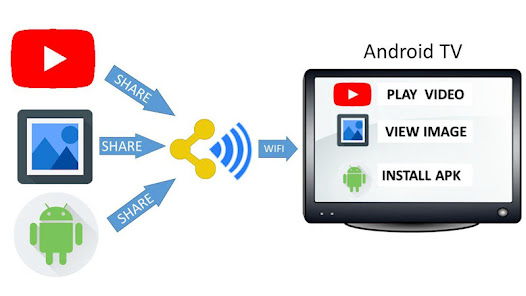
Air-Share is a Cloud-free Meta-Sharing app. Share from small screen to big screen without Screen Casting.
** It does NOT work over Mobile-data **
Most apps have a Share button. So why not Share directly to a second device like your Android TV?
1) Install Air-Share on 2 devices
2) Pair the devices
3) Share something from your favourite App via Air-Share to the second device
** Cloud-free means it does not work over Mobile Data Networks. Some VPN apps cause Pairing issues. Disabling the VPN may help Air-Share to function.**
Air-Share & Air-Launch were created to extend the Share & Launch features for all Android apps to share intents or launch intents between devices.
It's more than a File Transfer app; but it's no Cloud service; there is a tiny web server running inside the Air-Share app. The shared data never leaves your home network.
It allows sharing almost anything from, any app with a Share button, including large data streams.
Air-Share will use your WiFi, Ethernet or Bluetooth network, it is not recommended for use on Mobile data networks. It will also Google Cast.
It can share items that Chromecast cannot. It can queue your media links on Android TV as recommendations or notifications for later viewing. You can also share from PC/Mac/iPad to Android via your browser.
The app is great for sharing between family members. Share with Amazon Kindle/Fire devices, Android HDMI sticks and older Google TVs.
Air-Share also includes Air-Launch which is designed to launch apps remotely and side-load APKs on devices like Android TV using your phone or tablet. Air-Launch is part of the Air-Share App but appears as a separate app icon for convenience.
App Launching: Open the Air-Launch app icon and choose a device and an app to launch.
APK Side-loading: Long-press an app name in Air-Launch to download the APK from the remote device.
For non-android devices, generate unique browser URLs for an HTML-5 compatible browser to share to / from your Android device. Watch demo here :https://www.youtube.com/watch?v=vV6KzehnrHs
Your files stay on your local network. Transferred files are saved in your Downloads directory.
- share apps (APK files)
- share YouTube, Vimeo videos
- share links from your Facebook, G+ or RSS feeds
- transfer photos and videos from your Gallery apps
- share web-links, magnet urls, etc
- share cut & paste buffers between devices (long-press places text into remote device paste buffer)
- share files and office documents from your favourite file explorer (tested with Astro and ES Explorer)
- transfer and play instantly, music and movie files (mp3, mp4, etc), or queue as notifications to enjoy later
- share location , GPS coordinates, KML files, Google Tracks
- share contacts, people, vCards
- share files and web-links from any device with an HTML-5 browser on your network.
App Side-loading: You can use Air-Share in combination with "App Backup & Restore" (https://play.google.com/store/apps/details?id=mobi.infolife.appbackup) to side-load apps from your phone to your Android TV. Install Air-Share on both devices and pair them. Load "App Backup & Restore" on your phone and choose which app to share. Choose Share with other Apps, then Air-Share as the share destination. On the Air-Share screen choose your Android TV as the destination. (You must change your settings to allow loading apps from outside the play store.) As there is no Web Browser shipped on the Nexus Player, you may want to side-load one in addition to apps like QuickPic (Jpeg viewer). When side-loading from your phone keep in mind that the Nexus Player is an x86 device while your phone is likely ARM based, so native apps may have issues.
App Developers:
You can leverage Air-Share inside your own app using simple Android Intents to share content between paired devices.
See sample code: https://github.com/BlackSpruce/Air-ShareAPIDemo
You can also use "cURL" to script VIEW and SEND intents from other OS's:
see the Help/FAQ in the app for examples.
Air-Share 使用排名
基於 Similarweb 的算法,根據過去 28 天的安裝數和活躍用戶數進行計算。
所有類別 在
美國--
工具 在
美國--




 Air-Share VS.
 2月 23, 2026