

4月24日 的 USB Debugging 應用程式分析

USB Debugging
- Blue Dragonflies
- Google Play 商店
- 免費版
- 工具
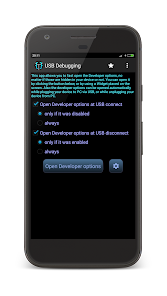
This app allows you to fast open the Developer options. The standard steps for opening the Developer options is Settings -> Developer options. Using this app, those options will appear automatically when you connect your device to USB or when you disconnect your device. Then you can choose which options do you want to enable or disable as you did before.
Using this app you don't need to manually enter the settings for development, as the application will do it for you automatically. Additionally, you can choose whether to display the Developer options. It can be displayed only when you connect your device to USB, as well as both connect and disconnect your device.
****************************
Note for Xiaomi users:
Developer options will be opened at USB events (if enabled) only if Autostart permission is set (Settings -> Permissions -> Autostart).
USB Debugging 使用排名
基於 Similarweb 的算法,根據過去 28 天的安裝數和活躍用戶數進行計算。
所有類別 在
德國--
工具 在
德國--
用戶興趣和熱門類別
USB Debugging用戶使用的熱門類別和應用程式












 USB Debugging VS.
 4月 24, 2026