


4月30日 的 Brother Print Service Plugin 應用程式分析
Brother Print Service Plugin
- Brother Industries, Ltd.
- Google Play 商店
- 免費版
- 生產力
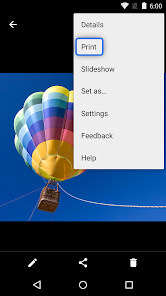
The Brother Print Service Plugin enables you to print directly from your Android devices (Android 5.0 or later), to your Brother printer through a Wi-Fi network. As this is a plugin application, you can print using the "Print" option of supported Android apps. Please see below for supported applications (as of March 2015):
- Chrome Browser
- Gmail
- Photos
- Google Sheets
- Google Slides
- Google Docs
- Google Drive
The following print options are available (compatible options will depend on the selected device):
- Copies
- Paper Size
- Color/Mono
- Orientation
- Media Type
- Quality
- Layout
- 2-sided
- Borderless
After installing this application, you must activate it in one of the following ways:
- Tap the icon displayed in the notification area immediately after installation, and enable it in the displayed screen.
- Tap "Settings" on your Android device and tap "Printing", then select "Brother Print Service Plugin". Enable it in the displayed screen.
Please visit your local Brother website for supported models.
To help us improve the application, send your feedback to Feedback-mobile-apps-lm@brother.com. Please note that we may not be able to respond to individual emails.
Brother Print Service Plugin 使用排名
基於 Similarweb 的算法,根據過去 28 天的安裝數和活躍用戶數進行計算。
所有類別 在
美國#9,602
生產力 在
美國#690
用戶興趣和熱門類別
Brother Print Service Plugin用戶使用的熱門類別和應用程式





















 Brother Print Service Plugin VS.
 4月 30, 2026