

3月5日 的 DAW IT 應用程式分析

DAW IT
- Dawvelopment
- Google Play 商店
- 免費版
- 音樂與音訊
DAW IT provides you with MIDI utilities such as: [Faders], [3D Pads], [Buttons], [Key Switches], [Aftertouch], [Sustain] and [Hold].
Requirements:
This app uses the USB port of your mobile device to send MIDI messages to your DAW. Compatible with Android 6 or later versions of Android. No extra drivers or hardware are needed.
Unlike other apps on the market, you can save any group of functions as Presets inside a file which is called Profile. Each Profile can hold multiple Presets, so it’s very easy to group them and share them with your friends or co-workers.
You can fully control the expression of your software synthesizers by assigning MIDI controllers to any function depending on your soft synths capabilities. Of course, you can do the same for your hardware synths if you connect them to your DAW.
[Faders]:
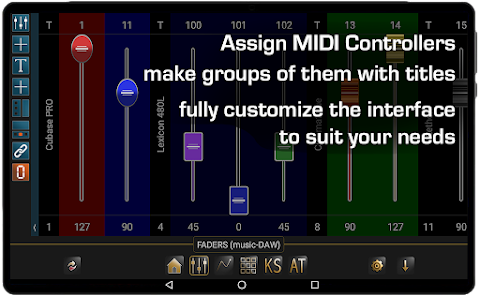
Add up to 40 faders per preset, organize them into groups of your favorite instruments or effects and assign to them their corresponding MIDI controllers. Name each group with a text label. Customize the look by selecting fader type, fader color, background color, number of rows and more.
[3D Pads]:
Usually the XY Pads let you control 2 MIDI Controllers with 1 finger on a square surface. With our app you can use a second finger to control a 3rd MIDI controller, that's why we call this function 3D Pads. Imagine to control Dynamics, Expression and Vibrato Depth of a Cello section, all in real time.
[Buttons]:
120 buttons per Preset, each button has two states (MIDI Controller and Program change), that you can swap on the fly one by one or all together. As a result this gives you 240 buttons in total, 120 per panel of the same state or mixed up. This is the right place to setup a Generic MIDI Remote Control for your DAW.
[Key Switches]:
Have you noticed that many soft synths use the lower or upper octaves as switches for the user to change the sound state? For example you can change your Violins section from Legato to Pizzicato or Spiccato with just a touch. DAW IT provides you with all 10 1/2 octaves to use as Key Switches.
[Aftertouch], [Sustain] and [Hold]:
Do you own a small or cheap MIDI keyboard without Aftertouch or Sustain pedal? Just tap the AT button on DAW IT and enjoy the use of one Aftertouch fader and two buttons, Sustain and Hold.
Web Site: https://dawvelopment.com
Learn More: https://dawvelopment.com/daw-it
User Manual: https://dawvelopment.com/daw-it-user-manual-contents
YouTube Channel: https://youtube.com/@dawvelopment
DAW IT 使用排名
基於 Similarweb 的算法,根據過去 28 天的安裝數和活躍用戶數進行計算。
所有類別 在
美國--
音樂與音訊 在
美國--



 DAW IT VS.
 3月 5, 2026