

4月24日 的 Chore Checklist - Lite 應用程式分析

Chore Checklist - Lite
- DotNetIdeas
- Google Play 商店
- 免費版
- 生產力
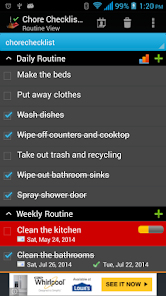
Chore Checklist helps you manage chores at home or other places. It records chores' completion date and calculates next due date based on your preference. The "automatic reset" feature always gives you a fresh start of each recurring chores. It resets daily chores after midnight(or any hour you specify in "Settings"). For weekly, monthly or other recurring chores, it resets the progress based on conditions(see "Automatic Reset" section in Help for more detail).
It comes with a pre-loaded check list which has routines, such as "Daily Routine", "Weekly Routine", "Monthly Routine" and etc. You can edit them or add new routine/chores. You can set start/end date, reminder, progress, and notes for each chore.
You will need to install this app on your phone(not SD card) in order to add a widget to home screen.
The app also allows you to create multiple lists. In "Due Date View", the user can combine multiple lists into one view sorted by due date.
This lite version has Ads and the following features are disabled:
*View, export/email history report
*Sync/Share/Backup lists (separate purchase of Cloud Connector is required. However, this feature will be retired at the end of 2023. We highly recommend trying out our newly redesigned "Opus - Task Helper" app, which offers a seamless and instant automatic sync feature through a new cloud service. The app is free, supported by banner Ads. You can download the app from the Google Play store at https://play.google.com/store/apps/details?id=com.dotnetideas.opus)
***Upgrade from Lite to Full app:
When you upgrade from lite to full, you can use the "Backup and Restore" feature to migrate your data.
To backup your lists, open the lite app and click on "Menu"->"Backup and Restore"->"Backup" in Routine View. Then click on "Backup" to use the default folder or "Select Folder" to choose a different location.
Then open the full version, click on "Menu"->"Backup and Restore"->"Restore". It will open default backup location. Choose the folder which contains backup files and click on "Restore". If you have chosen a different backup location, then navigate to that location and click on "Restore".
Chore Checklist - Lite 使用排名
基於 Similarweb 的算法,根據過去 28 天的安裝數和活躍用戶數進行計算。
所有類別 在
美國--
生產力 在
美國--


 Chore Checklist - Lite VS.
 4月 24, 2026