


4月29日 的 Screenshot 應用程式分析

Screenshot
- LoveKara
- Google Play 商店
- 免費版
- 工具
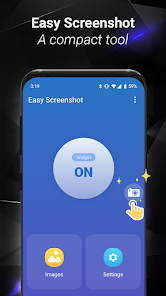
Easy Screenshot gives you the easiest way to capture your screen into images, it is the best snapshot tool.
1. You can take a screenshot by touching the shot icon or pressing power button and volume down button at the same time, or pressing power button and home button at the same time(on most Samsung phones).
2. You can specify the folders which the screenshots will be saved as images.
3. You can preview the screenshot and decide saving it or discarding it.
4. Croping any part of the screenshot.
5. Drawing on the screenshot.
6. Making mosaics on the screenshot.
7. Inputting custom text on the screenshot.
8. Sharing the screenshot after it’s taken.
Foreground Service & Screen Capture Notice
This app uses a foreground service with MediaProjection permission to enable the following core features:
Screen capturing and saving it to photo.
Why is this needed?
The foreground service ensures smooth performance while capturing your screen, and a persistent notification will remind you that the service is active. You can stop it anytime by closing the app or tapping the notification.
Privacy Promise:
We only capture content when you explicitly start the feature.
No background recording or unauthorized data collection.
Screenshot 使用排名
基於 Similarweb 的算法,根據過去 28 天的安裝數和活躍用戶數進行計算。
所有類別 在
美國--
工具 在
美國#2,972




 Screenshot VS.
 4月 29, 2026