

2月21日 的 Photo Curves - Color Grading 應用程式分析

Photo Curves - Color Grading
- Curved Nebula
- Google Play 商店
- 免費版
- 攝影
Edit your photos and videos using flexible color grading tools.
Create your own filters instead of searching through hundreds of apps with predefined presets, which you can't change. Each preset in Photo Curves is fully adjustable. You can easily create your custom presets too using flexible color grading tools. With this app you can correct, enhance or replace colors, change Hue, fix white balance or create cinematic Orange and Teal look, create 3DLUT files, resize images, adjust jpeg quality, and more.
The following tools are currently supported:
- Basic controls (brightness, contrast, shadows, highlights, saturation)
- Color wheels (shadows, midtones, highlights)
- RGB curves
- CMYK curves
- Lab curves
- Hue vs Saturation curve
- Hue vs Hue curve
- Hue vs Luma (Lightness) curve
- Luma vs Saturation curve
- Luma vs Hue curve
- Saturation vs Saturation curve
- Masking tool
- Adjustment layers
Export your color grading as 3DLUT (.cube) file or to your preset library to use it later or share with others. You can use build-in presets (filters) as is or as a starting point for your next color grading experiment. Remember - every preset is fully editable!
Preset library:
- Create your own presets or edit existing
- Export your presets to a file to share or import presets created by others
- Export presets as 3DLUT (.cube) files
- Library includes standard pre-defined presets too, including popular Orange Teal and other artistic filters
Color grading hints:
Basic Controls - brightness, contrast, shadows, highlights, saturation.
Color Wheels - mix a color into shadows, midtones, or highlights of an image.
Layer Masks - create adjustment layers and draw masks to apply color grading manipulations to a selected area of an image.
RGB curves - control red, green, and blue channels independently.
CMYK curves - control cyan, magenta, yellow, and key channels of CMYK color space.
LAB curves - manipulate brightness (L), and A, B color channels of LAB color space - unlike RGB, LAB color channels don't affect brightness component, enabling more creative color manipulations.
Hue vs Saturation curve - increase or decrease saturation of a color or a HUE range.
Hue vs Hue curve - change colors by selective HUE shift.
Hue vs Luma curve - adjust brightness of a color or a HUE range.
Luma vs Saturation curve - adjust saturation of shades, midtones, and highlights.
Luma vs Hue curve - shift HUE of shades, midtones, or highlights.
Saturation vs Saturation curve - boost unsaturated and decrease over-saturated colors to create evenly saturated HDR like images.
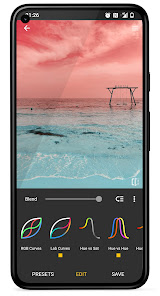
Photo Curves - Color Grading 使用排名
基於 Similarweb 的算法,根據過去 28 天的安裝數和活躍用戶數進行計算。
所有類別 在
美國--
攝影 在
美國--



 Photo Curves - Color Grading VS.
 2月 21, 2026