

4月24日 的 Morse Code Engineer 應用程式分析

Morse Code Engineer
- GyokovSolutions
- Google Play 商店
- 免費版
- 工具
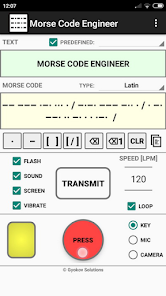
Morse code audio and light decoder, transmitter and morse code <-> text translator. Decode morse code transmission audio or light. Transmit using sound, flash, screen and vibration
App features:
- morse code audio/light detection using microphone and camera
- morse code transmission using flash, sound, screen and vibration
- morse code to text automatic translation
- text to morse code automatic translation
- input morse code using button or using buttons for dot, dash and space
- input predefined words
- add your own predefined words
- calibration for correct speed of the transmission
- different code books - Latin (ITU), Cyrillic, Greek, Arabic, Hebrew, Persian, Japanese, Korean, Thai, Devangari
There are free app Morse Code Engineer and paid app Morse Code Engineer Pro. Pro version has no ads and features:
- export of morse code to audio file and animated gif image
- encrypt/decrypt messages with customized encryption book
- adjust gap between characters and words
- customize morse code transmission sound
How to use:
TEXT -> MORSE CODE
Input text in text box. In morse code box the text will be automatically translated to morse code. You can change code book from drop down menu.
MORSE CODE ->TEXT
Input morse code in morse code box using:
- button key [PRESS] - by doing short and long inputs.
By default the input speed is auto detected and [SPEED] spinner (letters per minute) is updated. You can turn on/off speed autodetection in [SETTINGS - Auto detect speed]. If it is turned off you can use the [SPEED] spinner to adjust the speed of your input for better symbol recognition.
- buttons below morse code box - [ . ] for dot and [ - ] for dash. Use [ ] button to input space between letters. Use [ / ] for spaces between words.
You can clear symbols using backspace button or clear whole letter using backspace button for letters. Using [CLR] button you can clear bot text and morse code boxes.
The morse code will be automatically translated to text and filled in text box. You can change code book from drop down menu.
MORSE CODE TRANSMISSION
Transmission is started with [START] button and is using:
- flash
- sound
- screen
- vibration
You can control different options using corresponding check boxes.
When screen option is used then double click on small screen while transmission is running will turn full screen transmission. Double click will return to app screen.
You can change speed of transmission using speed spinner (letters per minute). You can loop the transmission by selectiong [LOOP] checkbox.
MORSE CODE AUDIO DETECTION
The app can listen and decode morse code transmission. To turn listening on select [MIC] on input panel and press [LISTEN] button. The app listens and detects morse code transmission and writes morse code in morse code box and translated text in text box.
MORSE CODE LIGHT DETECTION
The app can watch and decode morse code transmission using light. To turn listening on select [CAMERA] on input panel and press [WATCH] button. The app watches and detects morse code light transmission and writes morse code in morse code box and translated text in text box.
By default the input speed is auto detected and [SPEED] spinner (letters per minute) is updated. You can turn on/off speed autodetection in [SETTINGS - Auto detect speed]. If it is turned off you can use the [SPEED] spinner to adjust the speed of morse code transmission for better symbol recognition.
MENU OPTIONS:
- Settings - open app settings
- Code Book - shows selected codebook with letters and their morse code
- REMOVE ADS - you can remove ads for current app session (until app is closed) by watching an add
- Calibrate - runs calibration and sets correction time in order to adjust correct speed
- Gyokov Solutions - opens developer's web page
- Exit - exits app
- Version - shows app version
App privacy policy - https://sites.google.com/view/gyokovsolutions/morse-code-engineer-privacy-policy
Morse Code Engineer 使用排名
基於 Similarweb 的算法,根據過去 28 天的安裝數和活躍用戶數進行計算。
所有類別 在
美國--
工具 在
美國--



 Morse Code Engineer VS.
 4月 24, 2026