

2月27日 的 Remote EX for NISSAN 應用程式分析
Remote EX for NISSAN
- Dare Apps
- Google Play 商店
- 付費
- 通訊
Have you ever dreamed about activating your car accessories remotely from your mobile device?
The Remote EX for NISSAN allows you to activate several accessories from your car remotely. You can turn on the head lights, sound the horn and lock/unlock doors without touching your car keys.
* Turn Lights Flasher
* Parking Locator (*)
* Head Lights (*)
* Low Beam (*)
* High Beam (*)
* Front Fog Lights (*)
* Turn Lights (*)
* Open Trunk (*)
* Lock/Unlock Doors (*)
* Horn (*)
* Wipers (*)
Commands marked with (*) are available through in-app purchases.
*PLEASE NOTE* that other NISSAN models may be supported, but the plugin was tested only on the following models:
* 350Z 3.5 (Z33)
* 370Z 3.7 (Z34)
* Altima 2.5/3.5 (L32)
* Armada 5.6 (TA60)
* Frontier 4.0 (D40)
* Juke 1.6/3.8 (F15)
* March/Micra 1.5 (K13)
* Maxima 3.5 (A35)
* Murano 3.5 (Z51)
* Pathfinder 4.0 (R51)
* Qashqai 1.6/2.0 (J10)
* Tiida/Versa 1.8 (C11)
* Titan 5.6 (A60)
* Xterra 4.0 (N50)
* X-Trail 2.0 (T31)
Remote EX can also be used with the latest version of Torque Pro.
Installation
-------------------
1) After purchasing the application on Google Play, make sure that you see it listed on your Android device installed applications list.
2) Launch the app directly from your device or through Torque Pro by clicking on the app icon
3) Select your car model on the MODEL tab and confirm
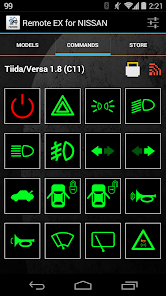
4) The app will display the available functions for your car on the COMMANDS tab
5) Commands displayed in GREEN are available to be used immediately while commands in GRAY are available through in-app purchases
6) Scroll to the STORE tab to check all the available commands for sale
7) Purchased commands are automatically added to the available command list and it is managed by Google Play, being available on all mobile devices linked to your Google account.
If using the plugin from Torque, make sure that you also:
1) Go to Torque Pro "Settings"
2) Make sure that you can see the plugin listed also on Torque Pro by clicking "Settings" > "Plugins"> "Installed Plugins".
3) Mark the "Allow plugins full access" box, since Remote EX needs access to the OBD adapter.
More features/parameters will be added in further releases. If you have comments and/or suggestions please just let me know.
Remote EX for NISSAN 使用排名
基於 Similarweb 的算法,根據過去 28 天的安裝數和活躍用戶數進行計算。
所有類別 在
美國--
通訊 在
美國--


 Remote EX for NISSAN VS.
 2月 27, 2026