

4月20日 的 3D Modeling App: Sculpt & Draw 應用程式分析
3D Modeling App: Sculpt & Draw
- 3D Modeling Apps
- Google Play 商店
- 免費版
- 藝術與設計
3D Modeling App allows you to easily make 3D models, objects, art and cgi graphics, paintings, create 3d characters and design 3d games on the go using gestures on your mobile phone or tablet. Our 3d editing app stands out from other drawing apps for adults.
Create a multitude of 3d objects for business. It is a useful addition to the toolkit of many professionals: use it as a 3d graphic design app, a 3d builder design app, a 3d drawing app for engineering, a landscape design drawing app, a 3d furniture design app, an industrial design app, and one of the best woodworking design apps. Automotive engineers can even use it for car design. For those looking for the best digital canvas for 3d pen work, painting, or sketching, 3D Modeling App is also a 3d painting app and 3d sketch maker. Find the right 3d brush for your task. Are you a crafter and maker who has long been looking for an all-around 3d art maker? Look no further. No stylus pen is required for 3d pencil drawing, but if you are an artist who relies on one, our drawing editor app supports it. Test your abilities as a digital sculptor, since 3D Modeling App is also a 3d sculpting app. For the model makers, it is also a 3d model maker and 3d object maker. This is the cgi creator for fast 3d.
And for game designers and developers, we provide a tool that lets you create 3d characters and design 3d games. It's the 3d animator you need to create cut scenes. Also use it to make 3d models of your characters and to accurately model 3d physics. Or try out the app as a 3d map maker to flesh out an immersive world for your game and 3d character.
Tons of features:
1. Fast workflow:
- Move and rotate 3d images, and scale 3d objects and the camera using gestures. Quickly switch between tools.
- Easily multi-select vertices, edges, faces, and objects by long tapping or drawing frames.
2. Vertex tools for 3d geometry: merge (target merge, collapse edges, collapse faces), connect, and create faces using vertices.
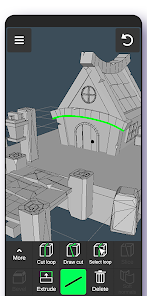
3. Edge tools: Draw a cut using a single swipe or by select one point by point, cut a loop (create new edge-loops), select a loop (also by double tapping), extrude, delete, select ring, create 3d faces using the border edge (fill in the hole).
4. Face tools: Extrude, draw a face using set points, detach, clone, select shell (also by double tap), reverse, delete.
5. Object tools: Combine/separate, clone, mirror, smooth, divide, and soft/hard normals.
6. Sculpting tools: Move, screen, push, pull, and smooth. You can adjust brush size and strength.
7. Display tools:
- Grid with settable size and snapping values.
- Display info: Triangles count, distance between vertices, and edge length.
- Wireframe on/off, shaded on/off.
- Shadows on/off.
- Axis on/off.
8. Coloring: Vertex color painting.
9. You can apply up to 20 materials to your objects.
10. Additional tools:
- Orthographic camera.
- Set move, rotate, and scale precise values.
- Display selected (isolate selection).
- Grow selection and convert selection.
- Move vertices, edges, 3d faces, and objects freely without grid snap.
- Snap: Grid, rotate angle, 2 axis plane, local space, physical penetration, ortho cam snap.
- Auto-save.
11. Export & import .obj files:
- Can be imported in 3D modeling software: 3ds Max Maya Blender Zbrush Modo Adobe Photoshop Adobe Illustrator MeshMixer Concepts Netfabb Forger - Can be imported in CAD software: Autodesk AutoCAD SolidWorks Tinkercad NX Catia Solid Edge Autodesk Fusion 360 Rhino Onshape Trimble Sketchup Maxon Cinema 4D (C4D) Autodesk Alias
- Can be converted to the following file formats using 3rd party converters: IGS IGES STP STEP JT SAT X_T X_B BREP WRL X3D 3DM STL DAE DXF GLTF FBX IFC 3DS to further import to Shapr3d (Shapr) or uMake 12.
3D Modeling App: Sculpt & Draw 使用排名
基於 Similarweb 的算法,根據過去 28 天的安裝數和活躍用戶數進行計算。
所有類別 在
美國--
藝術與設計 在
美國#46
用戶興趣和熱門類別
3D Modeling App: Sculpt & Draw用戶使用的熱門類別和應用程式
















 3D Modeling App: Sculpt & Draw VS.
 4月 20, 2026