

4月15日 的 UserLock Push 應用程式分析

UserLock Push
- IS Decisions
- Google Play 商店
- 免費版
- 工具
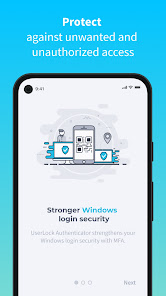
UserLock Push works with UserLock’s two-factor authentication solution to verify Active Directory user identities and secure their access to both on-premise and cloud resources.
UserLock Push can also work with other services that require two-factor authentication passcodes, such as Gmail and Facebook.
• How the app works
After entering your Active Directory login credentials, UserLock Push gives you two easy options for two-factor authentication:
1. One-Tap: Simply respond to the application’s push notification for easy, one-tap two-factor authentication, or
2. Enter the TOTP code generated by the app.
The app shows the location, device, and time of the login attempt to help ensure you approve the correct request.
To get a passcode for other applications and web services, enter your login credentials and then go to UserLock Push to recover the TOTP generated by the app.
• Self-enrollment with UserLock Push
Before enrolling with UserLock Push, your organization needs to enable UserLock and activate your account. Once this is done:
1. Install UserLock Push on your smartphone
2. Scan the QR code displayed at login
3. Enter the code generated by the app to confirm activation
4. UserLock Push is now configured as a second authentication method on your Active Directory account
You can add third party accounts at any time for TOTP passcodes.
UserLock Push 使用排名
基於 Similarweb 的算法,根據過去 28 天的安裝數和活躍用戶數進行計算。
所有類別 在
美國--
工具 在
美國#2,769
用戶興趣和熱門類別
UserLock Push用戶使用的熱門類別和應用程式













 UserLock Push VS.
 4月 15, 2026