

4月20日 的 GPS Map Camera 應用程式分析
GPS Map Camera
- JK.Fantasy
- Google Play 商店
- 免費版
- 旅遊與當地
Please watch the teach video to know how to use it.
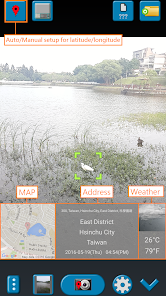
When you take a picture, this application will paste the map, address, weather and date to picture. (GPS latitude/longitude information also could be included)
This application is easy to get/set GPS location and GPS coordination for GPS Tag request.
[Quick GPS Map Camera Guideline]
When GPS Map Camera start, map/address/weather will be displayed on the camera preview. You can check the location/coordination before camera capture.
If you want to fine tune the location, manually setup the latitude and longitude also supported. (left-top button)
Support some drawing styles for map/address/weather/date. (left-top second button)
Support a variety of file-name formats to help you arrange your photos. (right-top second button)
You can change the picture save folder for help arrange photos. (right-top button)
In the camera setting page, the similar functions will be grouped with the same color.
- Camera Choice
- Flash
- Scene/Exposure/White Balance/ISO/Color Effect
- Focus Mode
- Anti-banding
- Picture Size/Picture Quality
- GPS Use/GPS picture save/Mp Type/Map Resolution/Map Zoom Scale/Map Size
- Photo Viewer
- Sound
- Prompt Dialog
The color of function string is white as default. If change to another function, the color will change to grouped color. It's better to recognize what you set.
[Others]
- Camera focus and zoom operation when preview:
Focus: use one finger to touch the screen.
Zoom: use two fingers to zoom in/out.
[Tips]
- Don't want to get MAP:
Settings -> GPS picture save -> one (original)
- Don't want to save GPS position:
Settings -> GPS Use -> disable GPS
- Don't want to popup prompt dialog:
Settings -> Prompt Dialog -> disable
【Final】
Thank you for use and watch! Hope this app is helpful for you.
GPS Map Camera 使用排名
基於 Similarweb 的算法,根據過去 28 天的安裝數和活躍用戶數進行計算。
所有類別 在
美國--
旅遊與當地 在
美國--




 GPS Map Camera VS.
 4月 20, 2026