

3月4日 的 AutoBarcode 應用程式分析

AutoBarcode
- joaomgcd
- Google Play 商店
- 付費
- 個人化
Automate your phone with QR codes!
AutoBarcode is a Tasker plugin that allows you to completely automate your phone with QR Codes. Simply scan a code (generate one here http://goo.gl/JBLg7 ) and react to it in Tasker any way you like!
(WARNING: TASKER IS AN ANDROID APP THAT AUTOMATES TASKS ON YOUR PHONE. THIS FEATURE ONLY WORKS WITH TASKER INSTALLED)
Note: AutoBarcode uses a Barcode Scanner installed on your phone. If no compatible scanner is found, it will open Android Market so you can download "Barcode Scanner" ( https://market.android.com/details?id=com.google.zxing.client.android ) for free.
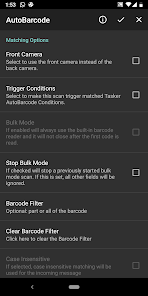
Very simple example: open Tasker and create a new profile with an AutoBarcode condition (State->plugin->AutoBarcode). To start out, check the Event checkbox and leave everything else blank. Then associate it with a task that simply flashes "Hello World!". After this run the AutoBarcode app and scan any QR Code with it. This should make "Hello World!" flash on your screen!
With AutoBarcode you have advanced matching options and even a flexible command system (see how it works here: http://goo.gl/PRQas) that allows you to truly personalize your experience.
Here are some examples on how you can use AutoBarcode:
- AutoBarcode is the Quickest way to let Tasker know you're at a specific place if there's no wifi or you don't want or can't use wifi (work, car, specific bedroom in your home). For example, have a QR code ready on your car's dashboard. When you get there, just scan the code, and Tasker can start playing your favorite songs with the volume turned way up, while opening google maps to show you the way.
- Create QR codes that enable or disable specific settings on your phone: turn off sound, enable blutooth, enable wifi when you get to work, etc..
- Use with AutoShortcut ( https://market.android.com/details?id=com.joaomgcd.autoshortcut ) and Winamp ( https://market.android.com/details?id=com.nullsoft.winamp ) to have fast access to your favorite playlists: have specific playlists at work, in your living room, in your bedroom, in your kid's bedrooms, in your car, etc
- Suprise your friends with your talking phone: generate QR codes and follow the instructions here: http://goo.gl/JBLg7
- Create a Scavenger hunt for your kids by spreading out QR codes with hints and clues on how to find the next one, by playing songs, videos, opening popups or webpages in tasker (or anything else you want!)
- Propose marriage in a cool and geeky way
By combining the power of QR Codes and Tasker you can do this and much, much more.
Follow our Community page to always get the latest updates on AutoBarcode: https://joaoapps.com/communities/redirect.html?p=autoapps
If anything goes wrong or if you have any suggestions, please remember that Developers can't respond to Market comments. If you have problems using AutoBarcode, just drop me an email.
AutoBarcode 使用排名
基於 Similarweb 的算法,根據過去 28 天的安裝數和活躍用戶數進行計算。
所有類別 在
美國--
個人化 在
美國--


 AutoBarcode VS.
 3月 4, 2026