

2月21日 的 WiFi Analyzer - Signal Meter 應用程式分析

WiFi Analyzer - Signal Meter
- Zoltán Pallagi
- Google Play 商店
- 免費版
- 工具
Is your WiFi slow, laggy, or constantly dropping? This app shows you exactly why — and how to fix it.
FIND OUT WHY YOUR WIFI IS SLOW
Most people blame their internet provider when WiFi is slow. But 80% of the time, the problem is inside your home: wrong channel, bad router placement, or interference from neighbors.
WiFi Analyzer shows you the real problem in seconds, so you can fix it yourself — no technician needed.
COMMON PROBLEMS THIS APP SOLVES
"My WiFi is slow but my internet plan is fast"
→ Your router is probably on a congested channel. The app shows you which channel to switch to.
"WiFi works in the living room but not in the bedroom"
→ Check signal strength in different rooms. Find the best spot for your router.
"My video calls keep freezing"
→ Test the actual speed between your phone and router — not just internet speed. Find what's causing the lag.
"I think someone is stealing my WiFi"
→ See every device connected to your network. Spot unknown devices instantly.
"My new router isn't faster than my old one"
→ Check if you're actually connected to the fast 5GHz or 6GHz band, not the slow 2.4GHz.
KEY FEATURES
Channel Analyzer & Recommendations
See which WiFi channels are crowded in your area. Get a clear recommendation for the best channel. One router setting change can double your speed.
Real Router Speed Test
Unlike regular speed tests that measure internet speed, this tests the actual connection between your device and your router. Find out if your WiFi — not your internet — is the bottleneck.
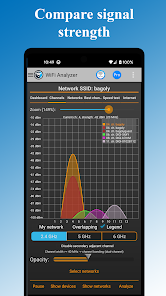
Signal Strength Meter
Walk around your home and see exactly where your WiFi signal is strong or weak. Find dead zones. Discover the perfect spot for your router.
Connected Device Scanner
See every phone, laptop, TV, and smart device on your network. Spot unauthorized devices. Know exactly what's using your bandwidth.
Network Security Check
Find out if your WiFi is secure. Detect outdated WEP or WPA security. Make sure you're protected with WPA2 or WPA3.
WORKS WITH ALL WIFI TYPES
✓ WiFi 7 (newest standard, 320MHz channels)
✓ WiFi 6E (6GHz band)
✓ WiFi 6
✓ WiFi 5 and older
✓ 2.4GHz, 5GHz, and 6GHz bands
✓ All router brands
HOW TO FIX SLOW WIFI IN 2 MINUTES
1. Open the app and let it scan your WiFi
2. Check the Channel view — is your channel crowded?
3. If yes, note the recommended channel
4. Open your router settings (the app can help)
5. Change to the recommended channel
6. Enjoy faster WiFi!
PERFECT FOR
- Home users frustrated with slow WiFi
- Apartment dwellers with lots of neighbor interference
- Gamers who need low latency
- Remote workers on video calls all day
- Anyone setting up a new router
- Parents managing kids' devices on the network
WiFi Analyzer - Signal Meter 使用排名
基於 Similarweb 的算法,根據過去 28 天的安裝數和活躍用戶數進行計算。
所有類別 在
美國--
工具 在
美國#4,985
用戶興趣和熱門類別
WiFi Analyzer - Signal Meter用戶使用的熱門類別和應用程式















 WiFi Analyzer - Signal Meter VS.
 2月 21, 2026