

5月1日 的 Pi SD Card Imager 應用程式分析
Pi SD Card Imager
- Mike Redrobe
- Google Play 商店
- 免費版
- 工具
Prepare bootable SD cards for your Raspberry Pi direct on your phone - no storage needed.
- No PC required !
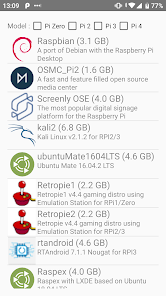
- Write Raspbian NOOBS / LibreELEC (KODI) / Ubuntu SD cards without root
- Can use internal / external SD card or USB card reader
- Write while downloading - doesn't use up GBs of space of phone
- Safe - by default does not delete files on SD
- Read/backup SD card (this feature needs root)
Can automatically download, and install OS to SD/USB
More details:
- Download OS images direct in the app
- Write Raspbian NOOBS / KODI SD cards without root
- Write SD Card direct from custom .img file or zipped .img (root)
- Backup SD card direct to a compressed zip file (root)
No root required for:
-Writing NOOBS based OS to SD Cards (NOOBS / NOOBS Lite / PINN / BerryBoot /LibreLEC KODI )
-Downloading OS files
Root required for:
- Backing up SD card to a zipped .img file
- Writing custom OS .img to SD Cards
Recommended to use an OTG USB cable and a USB card reader.
Twitter: @mikered
Pi SD Card Imager 使用排名
基於 Similarweb 的算法,根據過去 28 天的安裝數和活躍用戶數進行計算。
所有類別 在
美國--
工具 在
美國#7,683
用戶興趣和熱門類別
Pi SD Card Imager用戶使用的熱門類別和應用程式














 Pi SD Card Imager VS.
 5月 1, 2026