


4月30日 的 Notebooks 應用程式分析

Notebooks
- DroidVeda LLP
- Google Play 商店
- 免費版
- 生活方式
***Now backup/restore to Google Drive or Dropbox***
Take notes and even attach your free hand drawing, everything in style and completely without papers!
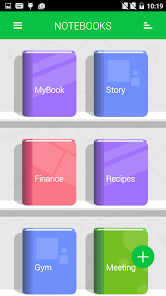
Create multiple notebooks for every subject and avoid messing up your notes.
Notebooks is the only application you will ever need for all your note making needs.
Designed with flexibility and ease of use in mind, taking notes is now at it simplest with our application. With multiple colors and custom title for each notebook cover, you will enjoy creating a notebook for every subject you want.
Notebooks is a must have application for students, business men and for anyone using their phones and tablets for taking notes.
*The permission GET_ACCOUNTS is to communicate with the Google Drive to backup the data. We do not store your account details in the app.
Features:
1. Create multiple notebooks.
2. Customizable cover, title, number of pages and page style for every notebook.
3. Password protected.
4. Set a title for every page.
5. Instant search within each notebook.
6. Attach image files.
7. Bookmark a page.
8. Create your own free hand drawing.
9. Easily find your entries.
10. Custom fonts for each notebooks.
11. Set theme for each notebook.
12. Convert the entire Notebook to PDF with attachments. (Currently supports English only)
13. Apply text styles such as Bold, Italics and Colored-Highlights
14. Backup/Restore.
(***Option available in the menu of the Notebooks screen. Some devices will not have the hardware menu
button on the device, in that case 'long press' the 'All Apps' button to get the menu on the app***)
15. Backup to Google Drive (Works on devices with OS higher than version 2.2)
FAQs: http://www.droidveda.com/faq/faq_notebooks.html
How to use?
1. Use '+' mark in the home screen to create new books.
2. Long tap on any book to edit/delete the book.
3. Use 'Password' option to set/reset the password.
4. On the Page tap on Page Header to set the Title for the page.
5. Make use of different editing options provided at the bottom of the page.
Note : Kindly download the verified app only from Google Play. Do not download the app from any other app sharing sites.
Notebooks 使用排名
基於 Similarweb 的算法,根據過去 28 天的安裝數和活躍用戶數進行計算。
所有類別 在
美國#6,591
生活方式 在
美國#454
用戶興趣和熱門類別
Notebooks用戶使用的熱門類別和應用程式














 Notebooks VS.
 4月 30, 2026