

4月21日 的 EDS 應用程式分析
EDS
- sovworks
- Google Play 商店
- 付費
- 工具
This version of EDS is outdated and intended for previous users and older devices. If you are a new user, please install EDS NG instead.
EDS (Encrypted Data Store) is a virtual disk encryption software for Android which allows you to store your files in an encrypted container. VeraCrypt(R), TrueCrypt(R), LUKS, EncFs, CyberSafe(R) container types are supported.
The program can operate in two modes. You can open a container in EDS or you can attach the file system of a container to the file system of your device (i.e., "mount" the container, requires root access to your device).
Main program features:
* Supports VeraCrypt(R), TrueCrypt(R), LUKS, EncFs, CyberSafe(R) container formats.
* You can create an encrypted Dropbox folder using EncFs.
* Choose among five secure ciphers.
* Cipher combinations are supported. A contatainer can be encrypted using several ciphers at once.
* Encrypt/decrypt any kind of file.
* Hidden containers support.
* Keyfiles support.
* Container mounting is supported (requires root access to your device). You can use any file manager, gallery program or media player to access files inside the mounted container.
* A container can be opened directly from a network share.
* Network shares can be mounted to the file system of your device (requires root access to your device). A network share can be mounted and dismounted automatically depending on the available Wifi connection.
* All the standard file operations supported.
* You can play media files directly from the container.
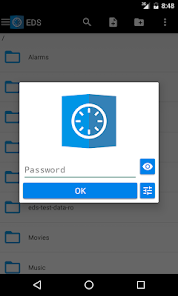
* You can use a hand-drawn pattern along with a password to get easier access to your container on a device with a touch screen.
* You can setup a database inside the container to store various kinds of information including logins, passwords, credit card pin codes, etc.
* You can use indexed search to quickly find files or database entries inside the container.
* You can synchronize your containers among multiple devices using Dropbox(R).
* You can quickly open a folder (or file) inside a container from the Home screen using the shortcut widget.
You can get more information on our website: https://sovworks.com/eds/ .
Please read the FAQ: https://sovworks.com/eds/faq.php .
Required permissions:
"Full network access"
This permission is used to play media files, to work with Dropbox, to work with network shares. Media files are played using http streaming with local socket connection.
"View Wi-Fi connections", "View network connections"
These permissions are used to start Dropbox synchonization of a container and to automatically mount or dismount a network share.
"Modify or delete the contents of your SD card"
This permission is required to work with a file or a container that is located in the shared storage of your device.
"Run as startup"
This permission is used to automatically mount containers on boot.
"Prevent phone from sleeping"
This permissions is used to prevent device from sleeping when a file operation is active.
"Google Play license check"
This permission is used to check the license.
Please send your error reports, comments and suggestions to eds@sovworks.com .
EDS 使用排名
基於 Similarweb 的算法,根據過去 28 天的安裝數和活躍用戶數進行計算。
所有類別 在
德國#211
工具 在
德國#43












 EDS VS.
 4月 21, 2026