

3月3日 的 Remote Control Collection 應用程式分析
Remote Control Collection
- Steppschuh
- Google Play 商店
- 免費版
- 生產力
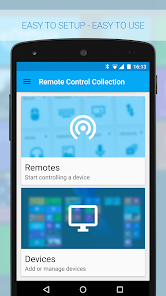
Use your Android device as a remote for your Windows PC or Mac - Control the mouse, keyboard, media, presentations and more!
The Remote Control Collection is a compilation of remotes, which you can use to wirelessly control your Windows PC or Mac. The unified remotes enable you to control the PC beyond mouse and keyboard!
What others say:
DotTech.org:
Very responsive and very convenient to use
Chip.de:
Solid application with brilliant simplicity
UnlockPWD.com:
There are many remotes out there, this one is on another level
Android-User.de:
Setting up this app is a no-brainer
TomsGuide.com:
Top app for controlling your PC
Included remote controls are:
-Mouse
-Keyboard
-Live Screen (Pro)
-Media Player (Pro)
-Slideshows (Pro)
-Speech Recognition
Mouse Remote
Imagine your PC’s touchpad right on your Android device. Multitouch gestures like scrolling and zooming are supported. You can toggle the keyboard to send keys at the same time.
Keyboard Remote
Use the physical or virtual Android keyboard to type characters and they will appear on your PC. Important keys like Windows, Escape and Control are also available.
Live Screen Remote
See your PC's screen live right on your Android device and control the mouse in real time.
Media Remote
Control the media player of your choice! Supported are Windows Media Player, iTunes, VLC, Media Monkey, Songbird and more.
Slideshow Remote
Control your slideshows directly from your smartphone! The screen of your PC will be transmitted to your smartphone in real time! That works with Powerpoint, Impress and Adobe Reader, Windows Media Center and more.
Speech recognition
Simply say what you want to be typed on your PC. You can also use voice commands to control your PC's media, e.g. "skip this track" or "turn the volume up".
Android Wear Support
You can now control your PC directly from your wrist! Super handy for presentations or controlling a media player.
Much more
The Remote Control Server is open source and can be used to control any device in your network. You can use this app to control all your internet of things (IOT) ready devices - like Arduino, Raspberry Pi and so on.
To receive the commands from the Remote Control App, you will need the Remote Control Server. You can download it for free from:
http://server.android-remote.com
If you have trouble setting up a connection, follow this step-by-step guide or watch the video tutorial at:
http://setup.android-remote.com/
Facebook fans can test the pro version for free:
http://facebook.com/RemoteControlApps
Permissions:
Network
For creating network sockets and using custom network protocols to connect with the pc.
Call information
Is needed to create a unique device id. Used to verify purchases and register unlock codes.
Approximate location
For analytics to improve localisation (translations, assets, etc.).
Media & Files
For caching to save network traffic.
Vibration
For haptic feedback.
Remote Control Collection 使用排名
基於 Similarweb 的算法,根據過去 28 天的安裝數和活躍用戶數進行計算。
所有類別 在
美國--
生產力 在
美國--
用戶興趣和熱門類別
Remote Control Collection用戶使用的熱門類別和應用程式





 Remote Control Collection VS.
 3月 3, 2026