

4月23日 的 LabCom 應用程式分析

LabCom
- Water-i.d.
- Google Play 商店
- 免費版
- 工具
Please note:
The app requires the location permission in order to connect to the PoolLab.
This is required by Android for Bluetooth 4.0⁺ connections inside an app.
-----------------------------------
The LabCom App is probably the most powerful and complete photometer tool in its field.
Through wireless connection you can:
• Create accounts (measurement sources)
• Synchronize measurements and remotely
controlled measurements (PrimeLab only)
• Calculate indices such as the Langelier
Index
• Display measured journals and send them
via PDF
• Test and set parameters and add new
parameters by entering a code to make
the PrimeLab more comprehensive
• Input your own water chemicals to create
dosing recommendations
• Free Cloud storage system
... is available and, when activated, can be consulted so that the measurement results automatically synchronize between all LabCom solutions.
Users such as public swimming pools, building service engineers, shipping companies, health departments, water companies and many others can view the field test results from their location at any time and immediately after the measurement.
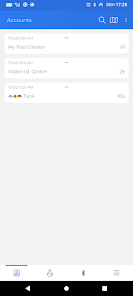
Test results are assigned to "accounts". Accounts can be set so that different locations of a public bath e.g. trainer pool, splash pool etc. have their results assigned to them.
Click on an account to view the measurement results. These originate either from automatic synchronization with the photometers when measurements were made with them without using the app as a remote control or by remote-controlled measurement of PrimeLab.
The measurement results are set according to accounts and in chronological order. This can be filtered (date, parameters) and exported as a PDF.
Also, the calculation factor can be triggered in this menu, an LSI (Langelier Saturation Index) and RSI (Ryznar Stability Index).
Test parameters not generated by the photometers but necessary for the calculation
of the indices values, such as temperature, conductivity, flow rate, etc. can be entered manually into the App.
Click on "Dos Rec” In the result detail view, the user is prompted for the target value and receives on the basis of the measured value associated with the amount of water (stored under the relevant account) and the individual “Setup” stored water treatment chemicals, a dosing recommendation to the water parameters to set ideal conditions for your water based on the chemicals you use.
As mentioned under "results", the app allows the user to give dosage recommendations based on their own individually stored water treatment products.
It must be inserted once so that you can use your own water treatment chemicals in the
app that will then be available for calculation of dosing recommendations.
Supported devices:
PrimeLab 1.0 Multitest
PoolLab 1.0
9-in-1 Multitest
Finwell PRO
LabCom 使用排名
基於 Similarweb 的算法,根據過去 28 天的安裝數和活躍用戶數進行計算。
所有類別 在
美國--
工具 在
美國--


 LabCom VS.
 4月 23, 2026