


5月3日 的 Wise Timetable 應用程式分析

Wise Timetable
- Wise Technologies Ltd.
- Google Play 商店
- 免費版
- 教育
To see your University or College timetable online, all you need is this easy-to-use mobile application, showing you the whole year timetable up-to-date. When you open application first time, you can either type in school code "demo" just to see how it looks or type in your real school code: this can be found by asking your school administration or by checking the code at the bottom right corner of Wise Timetable desktop web application (near to icons for Google Play Store or Apple Store).
After selecting the school (by entering its code), you need to select your student group(s) or lecturer name.
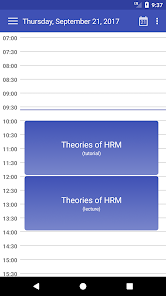
By default, day view is set to the current date (and hour) and you can see your daily timetable. A weekly view can be turned on simply by turning your phone horizontally or use the menu at the left side (slide menu or use top menu) where you can select also a monthly timetable view.
At the main menu, you can see all the alerts sent to you or connected to courses you are going to. These alerts are also embedded into timetable and can be spotted by "!" icon in the timetable event corner.
Your student group(s) or lecturer name setting can be always changed in Settings menu - to reflect your current year or subject area.
All the timetable events are shown in a blue color (blue boxes) next to corresponding hour. By tapping on these events you will get a detailed description. Non-lecture events like exam reservation or other custom events set by school administration are shown in light blue color.
To make this timetable view complete, please include your external calendars into the school timetable view. You can make this easily selecting a Settings menu and then set external calendars you want to see inside your timetable. They will be shown as green boxes. All day external calendar events (like birthday or holidays) will be shown at the day beginning, other will be shown at their exact hour. External calendars can be always turned on or off by selecting menu option at the top right corner above the timetable view.
In weekly view, you are able to control if weekdays are displayed (weekday names are always displayed with light red background).
To quickly go to the current date (today), you can click on the icon at the right top - with today's date number inside the icon.
Of course, navigation is done by simply dragging the view left or right and it works in daily, weekly or monthly timetable view.
Hope You will really enjoy with this application and we promise every improvement you want will be seriously considered and in most cases also implemented. So please do not hesitate to send your comments to info_wise@wise-t.com. Wise Technologies Ltd. will listen and act ;)
Wise Timetable 使用排名
基於 Similarweb 的算法,根據過去 28 天的安裝數和活躍用戶數進行計算。
所有類別 在
美國--
教育 在
美國--








 Wise Timetable VS.
 5月 3, 2026