

2月27日 的 ZeroPacket Offline Browser 應用程式分析

ZeroPacket Offline Browser
- xdenichi
- Google Play 商店
- 免費版
- 工具
[Summary]
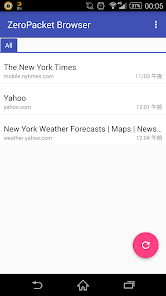
This application saves websites, you can browse even the websites in the offline.
[How to use]
1.Start the browser. Then, open the page you want to save.
2.Select the menu of your browser. [More]→[Share page]→[ZeroPacket Browser]
3.Start the ZeroPacket Browser. Then, open the saved page.
4.If you want to refresh the page, press [Update all] Button.
5.If you want to save the link page, press [Edit page]→[Page range] Menu.
[Recommended page]
CNN : http://edition.cnn.com/
New York Times : http://mobile.nytimes.com/
Reuters.com : http://mobile.reuters.com/
NBC News : http://www.nbcnews.com/
Bloomberg Businessweek : http://mobile.businessweek.com/
NBC Sports : http://m.nbcsports.com/
Yahoo! News : http://news.yahoo.com/
SI.com : http://m.si.com/
Gizmode : http://m.gizmode.com/
etc...
[Edit page]
1.Title
The name to be displayed in the list.
2.Page range
The default value is "This page". When "Link Depth 1", "Link Depth 2" and "Link Depth 3" is selected, to save a linked page from a specified page. However, update time will be longer.
3.Cache Size
Specify the maximum size of the storage capacity. When the image in the page that you saved does not appear, please increase this size.
4.Tag
specify the tag at the page that you save.
5.Useragent
specify the useragent.
[browser menu]
When you are browsing the page that you saved, press the menu button or long tap, you can do the following.
1.Edit page
Open"edit page" at described above.
2.Share
Share this page to other application.
3.Browser
Open this page in the browser .
[Main Preferences]
1.Display order
Specify the display order of the list. The default value is ”Entry”.
2.Wi-Fi Connection only
Warn when it is detected non-wifi communication. However, it is not in perfect check.
3.Delete all data
Delete all data that you save.note:The backup data are deleted, too.
[AutoUpdate]
1.Enable AutoUpdate
Off: default value. Update nothing.
On: Update the page at the time you specify on the following.
2.Time
Specify the time to automatically update.
3.Repeat
Check ON the day of the week to automatic update.
4.Tag
Specify the tag that automatically update.
*If the automatic update fails at Wi-Fi, please check the following settings.
Setting -> W-Fi -> Advanced ->Keep Wi-Fi on during sleep -> Always
ZeroPacket Offline Browser 使用排名
基於 Similarweb 的算法,根據過去 28 天的安裝數和活躍用戶數進行計算。
所有類別 在
美國--
工具 在
美國#8,290


 ZeroPacket Offline Browser VS.
 2月 27, 2026