

2月27日 的 DSLR Controller 應用程式分析
DSLR Controller
- Chainfire
- Google Play 商店
- 付費
- 攝影
DSLR Controller was the first and remains the best app to fully control your Canon EOS DSLR from your Android device, through USB cable or Wi-Fi connection. No computer or laptop required, no root required, only a compatible mobile device, a compatible camera, and if connecting through USB, the right cable.
We strongly suggest you read up on the website ( http://dslrcontroller.com/ ) about what DSLR Controller can do, how it works, and how to use it, before purchasing. The website contains a wealth of information you should know before using.
Not all devices are compatible, especially if you want to use a USB connection. For a free app you can use to test compatibility, see the "Remote Release" app ( http://market.android.com/details?id=eu.chainfire.remoterelease ). If you need a refund, go to our website ( http://dslrcontroller.com/ ) and follow the instructions in the FAQ entry. We cannot process refunds through email.
Usage notes, feature lists, device compatibility lists, changelogs, FAQs, can all be found on our website: http://dslrcontroller.com/
Most questions should go to the support and discussion thread at XDA-Developers.com:
http://forum.xda-developers.com/showthread.php?t=1202082
Features
Features include but are not limited to:
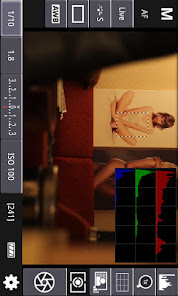
- Live View
- Auto Focus (tap Live View)
- Manual focus adjustments (in AF mode)
- Histogram
- Zoom control
- Grid and aspect ratio overlay
- Bulb capture
- Continuous capture
- Image review (+ follow shot, gallery)
- Image filters (peaking, contrast, channel mask, grayscale, 4 modes/filter)
- Video recording
- HDR/Auto Exposure Bracketing
- Focus Bracketing (incl. HDR)
- Focus A-B
- Mirror Lockup support
- Timelapse (incl. HDR)
- Wi-Fi Passthrough
- Extensive modification of settings
-- Shutter speed
-- Aperture
-- ExpComp and Bracket
-- ISO speed
-- Auto-Focus Mode
-- Focus and Zoom area (tap-and-hold Live View)
-- Picture Style
-- Drive Mode
-- White Balance
-- Color Temperature
-- Auto-Lighting Optimizer
-- Metering Mode
-- Image and video quality and format
Available options depend on the mode you have your camera set to (M, Av, Tv, etc) and camera model. Refer to the website ( http://dslrcontroller.com/ ) for further details.
Supported Android devices:
If you are connecting using Wi-Fi, virtually all modern Android devices are supported (your camera needs Wi-Fi support, though). If you are connecting over USB, your device needs USB host support - most recent devices do. Please see the 'Devices' section on our website ( https://dslrcontroller.com/devices.php ) for further information.
If your camera only supports USB, you can modify a TL-MR3040 to provide a Wi-Fi connection ( http://dslrcontroller.com/guide-wifi_mr3040.php )
Supported Canon EOS models:
Newer cameras than listed below are usually supported.
Full support:
- 1D Mark IV
- 1D X
- 1D X Mark II
- 5D Mark II
- 5D Mark III
- 5D Mark IV
- 5Ds(r)
- 50D
- 500D
- 550D
- 6D
- 60D
- 600D
- 650D
- 7D
- 7D Mark II
- 70D
- 700D
- 750D
- 760D
- 80D
- 1100D
- 1200D
- 1300D
- 100D
Limited support:
- 1D mk III
- 1Ds mk III
- 30D
- 40D
- 400D
- 450D
- 1000D
No support:
- pre-2006 models
- EOS M mirrorless devices (work in progress)
Let us know which hardware you are using with DSLR Controller!
DSLR Controller 使用排名
基於 Similarweb 的算法,根據過去 28 天的安裝數和活躍用戶數進行計算。
所有類別 在
美國--
攝影 在
美國--






 DSLR Controller VS.
 2月 27, 2026