

2月26日 的 Json File Opener Viewer Editor 應用程式分析

Json File Opener Viewer Editor
- Computer Bytes
- Google Play 商店
- 免費版
- 生產力
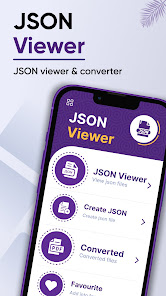
The JSON viewer for android permits the user to view, edit, create, and convert any JSON file into PDF. Using JSON viewer app, one can open JSON files conveniently using smartphone. Similarly, JSON viewer free lets the user edit already saved JSON files with just a click. Moreover, the JSON file opener viewer authorizes the user to convert the JSON files into PDFs. This JSON file opener allows the user to browse files directly from the app using the pick file feature. Finally, the JSON formatter permits the user to view converted, recent, favorite, and saved files directly from the app.
The JSON viewer feature of the file reader lets the user view JSON files stored on the device. In addition, the create JSON feature of read file allows the user to create JSON directly using their smartphone. Moreover, the pick file feature of JSON edit lets the user easily pick the JSON file of their choice. The converted files feature of JSON file app authorizes the user to open the pdf converted files directly from the app. Likewise, the recent files feature of opener permits the user to open the recently viewed files without closing the app. Finally, the saved files feature of JSON File Opener allows the user to open the saved files directly from the app.
Features of JSON File Opener Viewer Editor
1. The JSON viewer feature of the all file viewer lets the user view JSON files stored on the device. The user can open, view, edit, and convert any file of their choice. Using this feature, one can determine the title name, date of creation along with file size. The files menu authorizes the user to do the following with JSON files; view, edit, share, delete, and convert into pdf. Finally, the user can favorite the file of their choice for their convenience.
2. The create JSON feature of open file allows the user to create JSON directly using their smartphone. The folder file reader permits the user to use the mini map feature for their convenience.
3. The pick file feature of JSON editor JSON formatter preview lets the user easily pick the JSON file of their choice.
4. The converted files feature of JSON editor for android authorizes the user to open the pdf converted files directly from the app. Using this feature, one can determine the title name, date of creation along with file size. The JSON editer allows the user to do the following with the converted file; view, delete, and convert into pdf. In addition, the user can search for any particular file using search bar at the top. Finally, the user can favorite the file of their choice for their convenience.
5. The recent files feature of JSON file reader for android permits the user to open the recently viewed files without closing the app. Using this feature, one can determine the title name, date of creation along with file size. The JSON file viewer lets the user do following with the recent file; view, edit, share, delete, and convert into pdf. In addition, the user can search for any particular file using search bar at the top. Finally, the user can favorite the file of their choice for their convenience.
6. The saved files feature of JSON file editor allows the user to open the saved files directly from the app. Using this feature, one can view all the creations of the app. This feature is solely for the user’s convenience.
7. Finally, the favorites feature of JSON file reader permits the user to list favorite marked files in a separate folder. The JSON viewer lets the user do following with the recent file; view, edit, share, delete, remove from favorites, and convert into pdf.
How to Use JSON File Opener Viewer Editor
1. If the user wants to view JSON files, they are required to click on the JSON view tab.
2. Likewise, to create JSON file, they need to select the create JSON tab.
✪ Disclaimers
1. All copyrights reserved.
2. We have kept this app absolutely free by showing non-personalized ads.
Json File Opener Viewer Editor 使用排名
基於 Similarweb 的算法,根據過去 28 天的安裝數和活躍用戶數進行計算。
所有類別 在
美國--
生產力 在
美國--


 Json File Opener Viewer Editor VS.
 2月 26, 2026