

4月21日 的 FTP Server - Multiple users 應用程式分析

FTP Server - Multiple users
- Banana Studio
- Google Play 商店
- 免費版
- 工具
A powerful application allows you to run FTP Server on your phone and help your friend or you to access/share files over the Internet.
It also helps you not to use USB port of device to increase the lifetime of it. It is also called WiFi file transfer or wireless file management.
All features are totally free
You can remove ads by opening the section Remove Ads in About screen.
APPLICATION FEATURES
√ Use any network interfaces in your device including: WiFi, Ethernet, Tethering...
√ Multiple FTP users (anonymous user included)
• Allow each user to show hidden files or not
√ Multiple access paths for each user: Any folders in your internal storage or external sdcard
• Can set read-only or full write access on each path
√ Support simultaneous file transfer
√ Automatically open port on your router: Access files from everywhere on Earth
√ Automatically start FTP Server when certain WiFi is connected
√ Automatically start FTP Server on boot
√ Support scripting/Tasker
Tasker integration:
Add new Task Action (choose System -> Send Intent) with the following information:
• Package: net.xnano.android.ftpserver
• Class: net.xnano.android.ftpserver.receivers.CustomBroadcastReceiver
• Actions: either one of following actions:
- net.xnano.android.ftpserver.START_SERVER
- net.xnano.android.ftpserver.STOP_SERVER
To enable or disable the feature to open the ports on router automatically, please use the following actions:
- net.xnano.android.ftpserver.ENABLE_OPEN_PORT
- net.xnano.android.ftpserver.DISABLE_OPEN_PORT
APPLICATION SCREENS
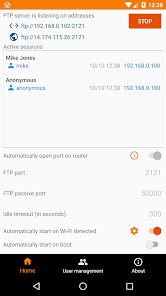
√ Home: Control the server configurations such as
• Start/stop server
• Monitor the connected clients
• Enable automatically start on specific WiFi detected, on boot...
• ...
√ User management
• Manage users and access paths for each user
What FTP Clients are supported?
√ You can use any FTP clients on Windows, Mac OS, Linux or even browser to access this FTP Server.
• FileZilla
• Windows Explorer: If user is not anonymous, please enter the address in format ftp://username@ip:port/ into Windows Explorer (username you created in User Management screen)
• Finder (MAC OS)
• File manager on Linux OS
• Total Commander (Android)
• Web browsers such as Chrome, Filefox, Edge... can be used in read-only mode
PASSIVE PORTS
The range of passive ports is from the initial port (default 50000) to the next 128 ports if UPnP enabled, or next 256 ports if UPnP disabled. In general:
- 50000 - 50128 if UPnP enabled
- 50000 - 50256 if UPnP disabled
From 0.13.0, the initial port is 60000
NOTICES
- Doze mode: Application may not work as expected if doze mode is activated. Please go to Settings -> Search for Doze mode and add this application to the white list.
PERMISSIONS NEEDED
√ WRITE_EXTERNAL_STORAGE: Mandatory permission for FTP Server to access files in your device.
√ INTERNET, ACCESS_NETWORK_STATE, ACCESS_WIFI_STATE: Mandatory permissions to allow user to connect to FTP Server.
√ Location (Coarse/Fine location): Required for user who wants to automatically start server on Wi-Fi connected on Android P and above.
* Please read Android P restriction about getting Wifi's connection info here: https://developer.android.com/about/versions/pie/android-9.0-changes-all#restricted_access_to_wi-fi_location_and_connection_information
* Android Q+: Because getting WiFi connection info while application in the background requires "Background location", so that, to operate properly, please select "Allow all times" when enable this feature.
SUPPORT
If you're facing any problems, want new features or have feedback to improve this application, don't hesitate to send it to us via the support email: support@xnano.net.
NEGATIVE COMMENTS can't help the developer to solve the problems!
Privacy Policy
https://xnano.net/privacy/ftpserver_privacy_policy.html
FTP Server - Multiple users 使用排名
基於 Similarweb 的算法,根據過去 28 天的安裝數和活躍用戶數進行計算。
所有類別 在
美國--
工具 在
美國--




 FTP Server - Multiple users VS.
 4月 21, 2026