

5月2日 的 BedrockTogether 應用程式分析

BedrockTogether
- BedrockTogether
- Google Play 商店
- 免費版
- 工具
BedrockTogether allows any Bedrock Edition server to show up as a LAN server on Xbox or PlayStation clients running Minecraft Bedrock Edition and permits a simple connection without the use of DNS rerouting.
Realms and compatibility with Nintendo Switch are currently not supported while using Bedrock Together.
How to connect:
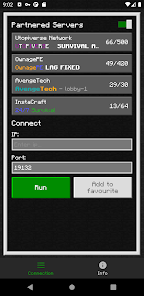
1. Enter your desired server IP and port.
2. Click the “Run” button.
3. Open game and navigate to the “Friends” tab.
4. Connect to the server using the LAN tab.
5. Close the Bedrock Together app after the client has joined the server.
Troubleshooting:
Make sure that
1. Your gaming console and mobile device are connected to the same LAN network.
If you find any bugs, join the discord to report them in the #bugs channel:
https://discord.gg/3NxZEt8 or telegram: t.me/extollite
The application icon made by nataliagemel.pl
Disclaimer: BedrockTogether is a third-party application. BedrockTogether is not an endorsed extension of or affiliated with Minecraft, its creators or proprietors, Mojang AB, Microsoft, Xbox, or Xbox Live in any way.
BedrockTogether 使用排名
基於 Similarweb 的算法,根據過去 28 天的安裝數和活躍用戶數進行計算。
所有類別 在
德國--
工具 在
德國--
用戶興趣和熱門類別
BedrockTogether用戶使用的熱門類別和應用程式











 BedrockTogether VS.
 5月 2, 2026