

2月22日 的 VerbTeX Pro LaTeX Editor 應用程式分析

VerbTeX Pro LaTeX Editor
- verbosus.com
- Google Play 商店
- 付費
- 生產力
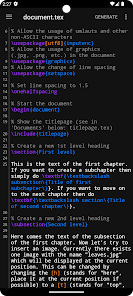
VerbTeX is a collaborative LaTeX Editor for your Android device. It allows you to create and manage LaTeX projects directly on your Android device and generate a PDF offline (Verbnox) or online (Verbosus).
This software is provided "as is" without warranties or conditions of any kind, either expressed or implied.
Pro version:
* Code completion (commands)
* Encrypted transmission (TLS) of your content
* Unlimited number of projects (Local Mode)
* Unlimited number of documents (Local Mode)
* Unlimited number of projects (Cloud Mode)
* Unlimited number of documents (Cloud Mode)
Features:
* Use PdfLaTeX, XeLaTeX or LuaLaTeX to generate a PDF
* Use BibTeX or Biber for bibliographies
* Offline compilation (Local Mode, enable in Settings)
* Automatic Dropbox synchronization (Local Mode)
* Automatic Box synchronization (Local Mode)
* Git integration (Local Mode)
* Zotero integration (Local Mode)
* Mendeley integration (Local Mode)
* 2 Modes: Local Mode (stores .tex documents on your device) and Cloud Mode (synchronizes your projects with Verbosus)
* Full LaTeX distribution (TeXLive)
* No account needed (Local Mode)
* Syntax highlighting
* Code completion (commands)
* Hotkeys (see below)
* Web-Interface (Cloud Mode)
* Collaboration (Cloud Mode)
* Two factor authentication (Cloud Mode, in combination with Copiosus)
* Autosave (Local Mode)
Import and export existing projects in Local Mode:
* Link to Dropbox or Box (Settings -> Link to Dropbox / Link to Box) and let VerbTeX automatically synchronize your projects
OR
* Use Git integration: Clone or track an existing repository
Use any .ttf/.otf font:
Put your font file inside your project and reference it in your document:
\documentclass{article}
\usepackage{fontspec}
\setmainfont{fontname.otf}
\begin{document}
\section{Main Heading}
Это тест
\end{document}
You can write chinese in PdfTeX using the CJKutf8 package as shown in the following example:
\documentclass{article}
\usepackage{CJKutf8}
\begin{document}
\begin{CJK}{UTF8}{gbsn}
这是一个测试
\end{CJK}
\end{document}
You can write chinese in XeTeX using the xeCJK package as shown in the following example:
\documentclass{article}
\usepackage{xeCJK}
\begin{document}
这是一个测试
\end{document}
If you experience any performance issues while using the editor please try
* to disable syntax highlighting and line numbers by choosing Menu -> Syntax Highlighting: ON and Line Numbers: ON
* to split up your project into multiple .tex files by using the \include{...} command of LaTeX
Hotkeys in editor:
ctrl+s: Save
ctrl+g: Generate PDF
ctrl+n: New document
ctrl+d: Delete document
ctrl+.: Next document
ctrl+,: Previous document
VerbTeX Pro LaTeX Editor 使用排名
基於 Similarweb 的算法,根據過去 28 天的安裝數和活躍用戶數進行計算。
所有類別 在
美國--
生產力 在
美國--
用戶興趣和熱門類別
VerbTeX Pro LaTeX Editor用戶使用的熱門類別和應用程式














 VerbTeX Pro LaTeX Editor VS.
 2月 22, 2026