

3月3日 的 iCamera: Camera iOS Style 應用程式分析

iCamera: Camera iOS Style
- VIT Studio
- Google Play 商店
- 免費版
- 攝影
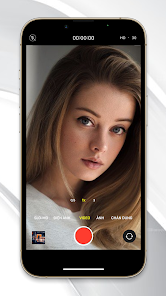
iCamera : Camera Legacy iOS Style Take your phone photo editing to the next level with Camera+ Legacy iOS Style - the best and most powerful photo capturing & editing app available. Camera+ Legacy iOS Style is designed by photo lovers on a mission to incorporate all the advances in photo technology that are being introduced year after year.
POWERFUL PHOTO EDITING
The Lab contains many photographic tools that allow you to fine-tune the exposure, boost the shadows, sharpen your photo, and adjust curves among many others. Dozens of built-in filters help you get that final look. Our favorites system makes it easy to save, share, and apply your favorite sets of edits to many photos at once.
RAW SHOOTING & EDITING
RAW mode provides maximum flexibility for editing, by saving the exact image captured by the sensor at its full precision. The RAW Editor includes tools such as Curves and a White Balance picker. Use the RAW Editor to develop your images, or send them to your computer and use your current workflow.
PHOTO LIBRARY INTEGRATION
We have achieved a fantastic integration with the photos you already have in your library. Instead of clunkily importing a photo you want to edit, doing your thing and saving it back, simply switch tabs and edit it right in place. And you'll love the multitasking support. The editors can also be used on the photos in your Photo Library.
CAPTURE PRESETS
Camera Legacy iOS Style adapts to your style and technical savvy. If you like the system camera, select the Auto preset to use a simple, clear interface that will let you concentrate on your shot. Camera Legacy iOS Style provides all the essential framing and exposure tools, and will select the best parameters for you.
As your skills progress, or if you are already familiar with DSLRs, you'll feel at home in Manual mode. You'll be able to select the best lens, shutter time, ISO or white balance for your capture.
Other presets are available for purpose-specific captures, providing sensible settings for the task at hand. Slow Shutter allows you to take long exposures, even in daylight. Macro is optimized to work on close subjects, and Action tracks the object you select and automatically enables Burst so you don't miss the shot.
INTRODUCING MAGIC ML
Magic ML is our most advanced capture preset to date. It harnesses the power of machine learning to improve your photos as you shoot! But don't just take our word for it, try out Magic ML and see how much more your photography "pops"! And if you've already got photos you'd like to spruce up a bit, we've added a Magic ML adjustment in the Lab so you can add as much (or as little) wizardry as you'd like.
TOTAL CONTROL
If your device has multiple lenses, the Auto preset will use the best one(s) for your scene -just like the standard camera does- and will produce Deep Fusion pictures if it needs to. In Manual mode you are the boss: Camera iOS Style 2 will always honor all the controls you choose. If you want to use the Tele lens, Camera Legacy iOS Style will not engage the digital zoom even if the Wide could gather more light. No more surprises after the fact.
SHOOTING ASSIST TOOLS
Use Smile mode to shoot when people are smiling, or Stabilizer to ensure your device is steady enough to produce a sharp picture. Burst and Timer can also be enabled any time you need them.
Focus Peaking highlights the parts of the image that are in focus, which is invaluable if you are focusing manually. Zebra Stripes detect those parts of your composition that are over- or underexposed.
DEPTH CAPTURE
Depth Capture, which is optimized for person subjects, is available in your device with dual or triple cameras. Depth information is saved alongside the image, and the adjustments in The Lab can be selectively applied to distant or close subjects.
iCamera: Camera iOS Style
iCamera: Camera iOS Style 使用排名
基於 Similarweb 的算法,根據過去 28 天的安裝數和活躍用戶數進行計算。
所有類別 在
美國--
攝影 在
美國--



 iCamera: Camera iOS Style VS.
 3月 3, 2026