

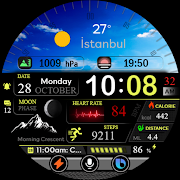
5月3日的BFF19- Digital: Color Metal应用程序分析

BFF19- Digital: Color Metal
- BFF-KING STORM
- Google Play 商店
- 付费
- 个性化
NOTE : You need to make sure the Google Play account on your phone and watch is the same. To avoid the situation: "Your devices are not compatible".
NOTE: The Watch faces sold by BFF-Storm on the Play Store are currently in the process of feature completion based on Samsung's new Wear Os Google / One UI operating system. So we are committed to update the watch face as soon as possible if a new function is completed. And when you have problems using it, you can contact us via gmail:
support@bffstormwatchface.com
We will support and answer questions 24/7.
NOTE: Make sure you have enabled all permissions from settings -> Applications.
NOTE: How to install watch face?
1 - Make sure the watch is connected to the electricity via bluetooth, open the watch face app page to install.
Open the "Install on more device" option (Triangle icon to the right of the free install or purchase button).
Turn off the settings on the phone just to set it on the watch. And do the installation.
After successful installation, a notification will be displayed on the watch, you can search the application on the watch.
If the app doesn't appear on the watch, open the Galaxy Wearable app on your phone, select watch faces and scroll down to the downloaded apps section and select watch faces to have them show up on the watch.
2 - If you have installed companion apps on your phone by mistake, you can delete them once the watch face has been installed.
3 - If you have sync problems between your phone, Play Store and watch, install watch face directly from your watch, or you can try from your PC web browser or visit our website to Search product.
This watch face supports all Wear OS devices with API Level 30+.
NOTE : Some features may not be available on some watches. This watch face will not apply to square face watches.
The BFF19- Digital & Analog: Color by BFF-Storm.
Watch Face Features: (You can see them on the picture description)
-12/24Hr based on phone settings
- Time information: Day, Month
- Health information: Step counts, Heart rate.
- Battery
Other customized information
- Optional background color * 8
- Optional color *10
Always on display supports:
- The AOD screen will be fully displayed as the normal screen you have installed.
You can see more details on our image description.
Customize :
1 - Touch and hold the screen
2 - Tap on customize option
Please visit us at:
Facebook: https://www.facebook.com/BFFKINGSTORM
Instagram: https://www.instagram.com/bffstormer/
Webpage: https://bffstormwatchface.com/
Thank You !!

BFF19- Digital: Color Metal 使用排名
使用率排名基于 Similarweb 的算法,该算法会计算 28 天内的当前安装量和活跃用户数。
所有品类在
美国--
个性化在
美国--


 BFF19- Digital: Color Metal VS.
 五月 3, 2026