

2月20日的Ping & Signal Detector应用程序分析

Ping & Signal Detector
- Anggrayudi
- Google Play 商店
- 免费
- 工具
The only Android app that can prevent the internet connection which often to falter, and find out the condition when you are surfing on internet. Equipped with notification bar to allow you to monitor the internet connection at any time. Also, you can be notified by this app when connectivity and condition of the connection is changed. So you can decide an action quickly.
Signal Detector is a must have app for online gamers. The effect created by this app is able to strengthen and stabilize your internet connection. Try and feel the difference while playing an online game by running Signal Detector.
NOTE #1: To make this app runs normally, please add an exception to this app on battery optimization settings. On Marshmallow devices and newer, go to Settings > Open battery optimization settings > All apps > Signal Detector > Don't optimize.
NOTE #2: Always install this app through Play Store. Installing it via another media could crashes Signal Detector.
• Prevent the Idle Connection
→ Some ISPs may enable the recycling connections system. It is a naughty system, makes you unable to surf the internet normally. You may experienced the moments where your connections are often to falter or disconnected from ISP, while your internet cable and modem are in good condition. This app has a feature that can prevent it.
• Know Your Network Condition
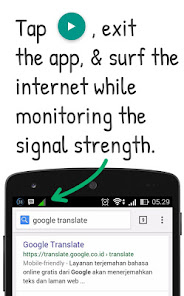
→ In some cases, you may ever use a chat app (e.g. BBM) to PING on your friends, only to find out your current network state whether slow or fast, good or bad. This action may disturb them. By using this app, you are no longer to do that. Just tap start, and the network condition will appear on notification bar. Very important to get the network condition before you surf the internet, especially before download a file. Do not download the file while status is bad.
Tips & Tricks
Run this app while downloading any files. Because of it could makes your device's CPU keep wake up, while the screen is off. So that, it keeps your download without being interrupted and stopped, and this method is better to save your battery power than keep the screen always on. Normally, all background tasks will be stopped by Android system if the device is asleep. So, activate this feature through Settings > Use partial wakelock.
And many more!
Tell us if you want this app to be translated into your language. Check it on 'Add Translation' menu!
NOTICE
If this app cannot prevent the internet connection to not falter or disconnected from ISP, please DO NOT leave your bad comment! Please check your internet cable or modem, something may go wrong (e.g. broken cable). If the problem cannot be resolved, please contact your ISP's costumer service. Asking a new feature can be sent through below email.
Ping & Signal Detector 使用排名
使用率排名基于 Similarweb 的算法,该算法会计算 28 天内的当前安装量和活跃用户数。
所有品类在
美国--
工具在
美国--



 Ping & Signal Detector VS.
 二月 20, 2026