

4月8日的GPS Tether Client应用程序分析
GPS Tether Client
- Bricatta
- Google Play 商店
- 免费
- 沟通
* For Android 6+, please ensure you allow 'Mock Locations' under your device Settings -> Developer Options. Please see FAQ for more info.
* Please ensure you are using the latest GPS Tether Server App (version 4+, e.g. v4.1). Version (major) must match.
*If you are facing any issues, please contact us using the form in the app.
Great for navigation! On the road, at sea, or trekking
To share and tether GPS using WiFi between 2 devices. Best example would be your phone and tablet. With this app, your phone with GPS functionality feature (server), will send GPS data to your tablet (client) using WiFi. With this, you are no longer constraint to your phone, but can utilize your big tablet for apps which requires location (e.g. Maps, fourSquare). There are many advance features built-in, such as encryption, automatic server search, and much more. This app must work in a pair; server and client. Please ensure you download the correct app. This app does NOT work in the background. Please see our other app called "Gps Tether Client Legacy" which works in the background and can be used with Google Maps.
A common example will be using your Android phone's and share tether GPS with a tablet (can easily buy it nowadays for <$100). This is a great way to escape the phone's small screen, and enjoy the tablet's big screen. On top of this, one can be creative as it can also be used to share tether GPS to a device located indoor, using WiFi network (server will be outdoor, client will be indoor). It has limitless possibilities...
If client app does not show up in the market, download it from www.bricatta.com
How it works :
It is very plain and straight-forward. This application solution will tether the GPS data (using WiFi) from a device with GPS feature, to another device. Both devices must be on the same WiFi network (Android device can be a WiFi hotspot). No internet connection is required for it to work (free trial uses it for advertisements). For efficiency purposes, this solution comprises of 2 small applications :
- Server (usually installed on phone, device which sends GPS data)
- Client (usually installed on tablet, device which receives GPS data)
Features :
- Smartly establish and send GPS info over WiFi
- Encrypt the GPS data before sending For security. This will avoid eaves-dropping and ensure only your devices will be able to receive the GPS data.
- Save and conserve battery by setting application's run time to your preference, so it does not need to run longer than needed.
- Remembers previous server settings and automatically connect when started
- Ability to disconnect clients on the server application.
- User can specify server port to use
- Manually add server for faster access or Scan server automatically
- Touch text to copy GPS coordinates (paid version only)
How to use it in brief :
- After installing both Client and Server app, you will need to ensure your device settings are correct.
- For Server, ensure the GPS is enabled. It is under Settings (see screen shot)
- Ensure both Server and Client are on the same WiFi network. You can use your Android device to become a WiFi hotspot.
- Start the Server and Client.
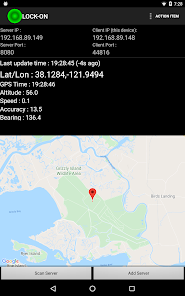
- On the client, select ScanServer. To be faster, manually add-in the server IP.
- Both server and client should be in "On" status
- Wait for server's GPS to "Lock-On", and the client will automatically get the GPS data.
Free Edition :
- Limit of 99 minutes
Privacy Policy & Location Data Usage :
https://www.bricatta.com/others/privacy-policy/
For more info :
Support : support@bricatta.com
Details on how to use this app : https://gpstether.bricatta.com/
FAQ : https://gpstether.bricatta.com/faq/
GPS Tether Client 使用排名
使用率排名基于 Similarweb 的算法,该算法会计算 28 天内的当前安装量和活跃用户数。
所有品类在
美国--
沟通在
美国--



 GPS Tether Client VS.
 四月 8, 2026