

4月16日的PrintHand Mobile Print Premium应用程序分析
PrintHand Mobile Print Premium
- PrintHand
- Google Play 商店
- 付费
- 生产力
Print directly from your phone or tablet via WiFi, Bluetooth or USB cable without a computer. Direct mobile scanning is available for selected multifunction printers.
NOTE: Unfortunately, we had to remove the SMS and Call log printing features from our app due to the update to the Permissions policy on Google Play. Dear customers, we are as much upset by this issue as you are. And we are doing our best to resolve the issue.
Using PrintHand you can print the following content:
- Office documents, including MS Word, Excel, PowerPoint, PDF;
- Text files and other popular file types;
- Photos and images;
- Web pages, emails and attachments;
- Google Drive content;
- Events from Calendar app;
- Contacts;
- Facebook albums;
- Files from Dropbox;
- Files from Box;
- Files from OneDrive;
- Files from Creative Cloud;
- Files from SugarSync;
- Notes from Evernote;
- Content shared from other apps.
Print to Mac or Windows shared printers, Workgroup, Domain and Active Directory. Print directly via USB cable from Android 4.0 and above. Print to Google Cloud. Share the printer with our free software for Mac and PC from printhand.com, and print to any printer as long as you can print from the computer.
You can print via:
- Wi-Fi (using a Wi-Fi Direct printer or using a Wi-Fi router as a middle man);
- Bluetooth;
- USB if USB OTG is fully supported by your device and it has Android 4.0+ installed. Please note that some of the mobile devices are unable to communicate with a printer properly even if USB Host mode is supported. This happens due to specific electrical design of the USB port. Sadly in such case the app is not likely to work properly.
- PC or Mac (if your printer is shared using PrintHand desktop client or standard tools of your computer's OS);
Here is the list of printers supported by PrintHand app:
http://printhand.com/list_of_supported_printers.php?platform=android
Aslo here is the list of supported portable printers:
http://printhand.com/list_of_supported_portable_printers.php?platform=android
Please make sure that your printer is supported.
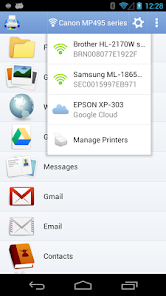
Our Printer Setup Wizard will detect your printers automatically and guide through the configuration process if needed. In a few clicks you’ll be able to print.
You can now scan documents directly from the selected multifunction printers to your device. This feature is available in beta mode, please contact support@printhand.com for details. List of supported devices available at http://printhand.com/list_of_supported_scanners.php.
You can try to print test page in our free app, but for unlimited printing you have to purchase premium app or make in-app purchase in free app.
Have a good print!
PrintHand Mobile Print Premium 使用排名
使用率排名基于 Similarweb 的算法,该算法会计算 28 天内的当前安装量和活跃用户数。
所有品类在
美国#658
生产力在
美国#78


 PrintHand Mobile Print Premium VS.
 四月 16, 2026