


5月3日的IFP Copenhagen Watch Face应用程序分析

IFP Copenhagen Watch Face
- Ian Frank Productions
- Google Play 商店
- 付费
- 个性化
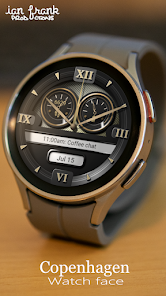
The Copenhagen is a realistic, analogue watch face, designed to appear beautiful, classic and informative. It has many customization options, such as different color schemes, backgrounds, hands on/off and more. Make your watch appear how you want, and display the data you want.
All features of the Copenhagen Watch Face:
- 10 color schemes
- 10 background options
- 2 user defined complications*
- Step counter gauge
- Battery monitor gauge
- 2 different Watch Hands
- 2 different Gauge hands
- Watch hands On/Off
- Index On/Off
- Index Background On/Off
- Index Plates On/Off
- Power Saving Always On Display
- AOD colors follows the color theme you select**
*You can select the data that is important to you in the 2 customizable Complications. The appearance depends on the service provider you selected. You can also select a shortcut to your favourite app on the watch.
**The simplistic AOD (Always On Display) shows the watch hands and the index (if enabled), in the colors of the theme you selected. This only utilizes 2% of the screen, making the AOD very power saving.
How to customize:
Once the Watch Face is installed and selected, long press the Watch Face and select ‘Customize’. Swipe left/right to select category, and swipe up/down to select option.
Customization Options:
Color : 10 available
Background : 10 available
Watch Hands : On/Off
Gauge Hands : On/Off
Index Ring/Background : On/Off
Index : On/Off
Index Plates : On/Off
Complication : Tap to select
How to Install
Option one:
Install the companion app to your phone, then open it and choose Install to open the watch face in the App Store on your wearable.
Option two:
Select your Wearable from the list of target devices in Google Play, and click Install. The Watch Face will be installed automatically on your watch within a few minutes.
Activate the watch face
The watch face is not activated automatically.To select the watch face, long press your watch screen, and swipe past all watch faces on your list, until you see ‘Add Watch Face’. Tap it, and scroll all the way to ‘Downloaded’ category. Here you will find your new Watch face. Tap to select it. Thats it. 🙂
Important!
This is a Watch Face for Wear OS, and it only supports wearables using API 30+ such as Samsung Galaxy Watch 4, 5, 6 and later. If you can select your Wearable from the install list, it should be supported.
If you have any kind of trouble or questions, please contact me at watchface@ianfrank.dk.
If you like this watch face, please leave a nice review. Thank you! 🙂
IFP Copenhagen Watch Face 使用排名
使用率排名基于 Similarweb 的算法,该算法会计算 28 天内的当前安装量和活跃用户数。
所有品类在
美国--
个性化在
美国--


 IFP Copenhagen Watch Face VS.
 五月 3, 2026