

2月22日的Ping Monitor On Status Bar应用程序分析

Ping Monitor On Status Bar
- MR Studios
- Google Play 商店
- 付费
- 工具
Ping (often referred to as Packet Internet Gopher) is a utility program that can be used to check network productivity based on Transmission Control Protocol / Internet Protocol (TCP / IP) technology. By using this utility, it can be tested whether a computer is connected to another computer. This is done by sending the packet to the IP address for which you want to test connectivity and waiting for a response from it.
For those of you fans of online games, ping is very important, because it can affect your performance when playing games.
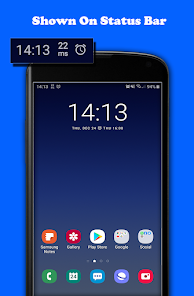
This application is very useful for monitoring latency conditions on your internet ping. The smaller the ping latency value, the better the level of responsiveness.
✰✰✰ Paid version special features ✰✰✰
- Auto stop service After 3 minutes screen off
- Auto save new Host/IP address
For its own use, there are several ways, namely:
1. IPv4 - All you have to do is enter the IP address you are going to test. Example of IPv4: 8.8.8.8
2. Host name - Enter the host address and website address. Example Hostname: yourhostname.com
3. IPv6 - In order to run IPv6 tests, make sure the internet network you are using also supports IPv6.
Example IPv6: 2001:4860:4860::8888
*Important
For Android users below the OREO version, the ping status cannot be displayed on the regular status bar, for that we created a floating view (overlay) which will appear in the top center of the screen, and this requires overlay view permission.
Ping Monitor On Status Bar 使用排名
使用率排名基于 Similarweb 的算法,该算法会计算 28 天内的当前安装量和活跃用户数。
所有品类在
德国--
工具在
德国--
用户兴趣点和热门类别
Ping Monitor On Status Bar 用户使用的热门类别和应用程序








 Ping Monitor On Status Bar VS.
 二月 22, 2026