

4月19日的Add Text: Text on Photo Editor应用程序分析

Add Text: Text on Photo Editor
- Nareck
- Google Play 商店
- 免费
- 摄影
Hello & Welcome!
Add Text app is the all-in-one tool for text creation. Texts can be added to a photo, gradient, solid color or a transparent background.
HIGHLIGHTS
• 1800+ fonts, + ability to add unlimited number of your custom fonts (including emoji fonts)
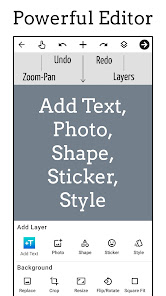
• Add layers: texts, photos, shapes, stickers and saved text styles
• Design parts of the text separately: supported in Font, Format, Color, Stroke, Highlight tools
• 3D text tools: 3D Rotate, 3D Depth, Perspective
• Change text size, wrapping and scale to get any type of text layout
• Layers view: reorder layers (overlays), change visibility, lock/unlock for each layer
• Tools for background: Effects, Crop, Resize, Flip/Rotate, Square Fit
• Save your text creation in Style tool to reuse later for watermarks, signatures, branding etc
• Save project to edit & reuse later, create templates
• Save image as JPEG, PNG or WebP file
• Dark mode to reduce eye strain and save battery life
• Professional support for all users: hi@addtextapp.com
• Constantly maintained according to our users' feedback
FEATURES
• Add multiple texts (and overlays) on photo, edit each one without losing final preview
• Move, scale, rotate, edit, copy, delete (for overlays) and wrap the text by text-box handles
• Font and Format tools: change font, alignment, text size, with bold, italic, underlined & strikethrough options
• Change text color & opacity: can be applied on each word/letter separately
• Add Stroke (Outline) to text with colors and stroke width
• Highlight the whole text or separate parts with different colors & opacity
• Letter & Line spacing
• Positioning grid with snapping option, flip overlay horizontally and/or vertically
• Bend the text: text along a curve
• Shadow with colors, opacity, blur and positioning
• Predefined Gradients: edit start/end colors and gradient angle
• Texture by adding any photo and make any type of transformation with it
• Opacity and Blend with background
• Erase tool: Clear parts of text with brush to achieve Text Behind effect (see screenshot)
• Color tools have eyedropper, color picker and predefined colors
• Add Stickers/Emojis, hundreds of them arranged in 8 categories
• Add any photo from your phone as an overlay
• Add 100+ shapes: with both filled and outlined versions
• Tools for other overlays: Opacity, Position, Perspective, Crop, Shape color, stroke & width
• Change the background without starting your work from scratch
• Pan mode: move canvas with one finger & pinch to zoom without worrying to accidentally touch overlays
• Pin mode: pins the background so that you won't accidentally change its position
• Fit: bring canvas to its original position (fit to screen)
• Undo & Redo history
• Fast sharing: showing recent apps you shared your work to
• All these and more in a small sized APK
If you come across any problem or have a suggestion please contact at hi@addtextapp.com
Spread the word to make this free tool available for everyone. Inspire us for the next releases. And rate us in Play Store.
So go ahead and create a meme, quote, Instagram story, Youtube thumbnail, banner, cover photo with captions, word art, poster, flyer, invitation, logo etc.
Stay Young at Heart!
Nareck
Add Text: Text on Photo Editor 使用排名
使用率排名基于 Similarweb 的算法,该算法会计算 28 天内的当前安装量和活跃用户数。
所有品类在
美国#7,860
摄影在
美国#131
用户兴趣点和热门类别
Add Text: Text on Photo Editor 用户使用的热门类别和应用程序














 Add Text: Text on Photo Editor VS.
 四月 19, 2026