


5月3日的Volleyball Scoreboard应用程序分析

Volleyball Scoreboard
- SeedsJP
- Google Play 商店
- 免费
- 体育
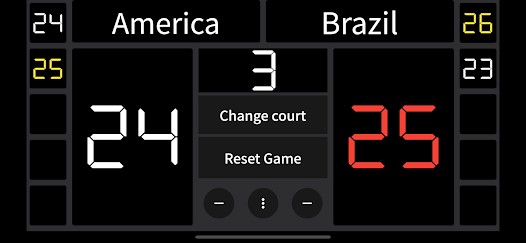
Volleyball scoreboard that simple and easy to use .
Team names can be entered.
● How to use
1. Adding points
Tap the top of the score to add points.
2. Point deduction
Tap the "-" icon to deduct points.
Use this when you have added points by mistake.
3. Coat Change
Tap the "Court Change" button to reverse the score.
4. Reset
Tap "Reset Game" button to reset the score.
5. Change Team Name
Tap the team name to change the name.
6. Serve indicator.
When the setting is turned on, the ball icon will be displayed on the score of the team that scored the point. For now, it is not supported when points are deducted (when the minus button is tapped). If the team that has the right to serve is wrong, you can replace them by tapping the ball icon in the middle of the screen.
7. Save the game results.
You can choose whether or not to save the game record when the game is reset. The maximum number of game records that can be saved is 10; if the number exceeds 10, the oldest record will be deleted and a new game result will be registered. To view the game record, swipe the scoreboard to the left or right.
8.Timer
The timer screen can be accessed by swiping the scoreboard. This timer can be used for timeout (30 seconds), technical timeout (60 seconds), and between sets (3 minutes).
Volleyball Scoreboard 使用排名
使用率排名基于 Similarweb 的算法,该算法会计算 28 天内的当前安装量和活跃用户数。
所有品类在
美国--
体育在
美国--











 Volleyball Scoreboard VS.
 五月 3, 2026