

2月26日的NetSupport Manager Control应用程序分析

NetSupport Manager Control
- NetSupport Ltd
- Google Play 商店
- 免费
- 商业
The NetSupport Manager Control for Android provides mobile remote control and remote desktop access for existing NetSupport Manager remote control users remotely from any Android Tablet or smartphone.
The mobile Control allows a user to quickly search and connect to both local computers by either IP address or PC name, or to browse, connect and view remote computers utilizing the free NetSupport Manager Internet Gateway component.
The NetSupport Manager Control provides full remote control, chat and message capabilities of any remote PC running an existing NetSupport Manager Client (version 11.04 or later).
KEY FEATURES:
Browse your local network or an established NetSupport Internet Gateway to find remote NetSupport Manager Clients.
PIN Connect feature allows a technician to instantly locate a user anywhere across the enterprise simply by both parties entering a unique PIN code.
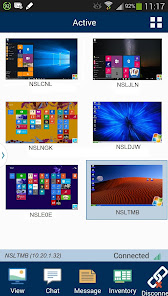
Thumbnail view of each connected Client device.
Select, connect and interact with multiple Client devices simultaneously.
See a list of previously connected Clients for instant ongoing connectivity.
‘Recently Connected’ list provides quick access to the most recently viewed Clients.
Use home screen widgets to provide access to frequently viewed Clients.
Remote Control – Watch (view only), Share (both parties can view and interact) or Control (remote screen and keyboard are locked) any NetSupport Manager-enabled remote PC.
View the remote PC using pinch, pan and zoom to highlight key screen information.
Adjust colour depth during remote control sessions from full colour, to 256, 16 or just 2 colours when reading remote documents.
Conduct a text chat session with the remote user.
Send a message to the remote user with an optional time-out facility. Ideal for alerting your users of impending server or email maintenance.
Generate a full hardware inventory report for a remote device on demand.
View the current status of wireless networks and display battery strength for a connected Client laptop.
Includes powerful compression to minimise data usage.
Use 64, 128 or 256-bit encryption for each session.
Multi-monitor support.
Utilise unique security keys to ensure your copy of NetSupport Manager is only accessible to your users.
One-click send Ctrl+Alt+Delete for remote login or PC management.
GETTING STARTED:
1)Install this free NetSupport Manager Control app on your Android device.
PLEASE NOTE: The application may be installed onto your external storage, but the system will install the application on the internal storage by default. If the internal storage is full, then the system will install it on the external storage automatically. Once the app is installed however, you can move the application to either internal or external storage through your system settings.
2) Visit www.netsupportmanager.com and download the NetSupport Manager Client setup file for installation on each of the computers that you want to remote control.
3) Wirelessly connect your Android device to the same network as the client computers ( or for anywhere access, refer to www.netsupportmanager.com for details on setting up and configuring the free NetSupport Gateway – designed to support this scenario).
4) From the NetSupport Manager Control browse and find your Clients.
5) Select a Client and choose to View, Chat or send a Message.
NetSupport Manager Control 使用排名
使用率排名基于 Similarweb 的算法,该算法会计算 28 天内的当前安装量和活跃用户数。
所有品类在
美国--
商业在
美国--


 NetSupport Manager Control VS.
 二月 26, 2026