

3月2日的Scoreboard Basketball应用程序分析
Scoreboard Basketball
- oootaiji
- Google Play 商店
- 免费
- 体育
It's scoreboard app for basketball.
It is recommended for use in basketball.
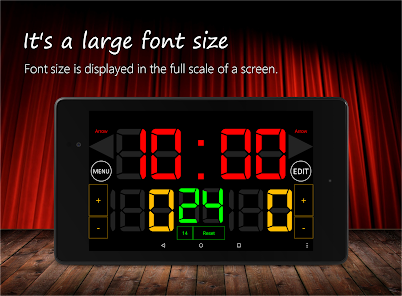
Font size is displayed in the full scale of a screen. And buzzer is large volume.
Scoreboard is simple design and easy to use!
How to use Bluetooth:
Please download Scoreboard Remote.
This scoreboard has four display types:
- Simple Mode (Timer & Scores)
- Basketball Mode (Timer & Scores & Shot Clock)
- Shotclock Mode (Timer & Shot Clock)
- Basketref Mode (Scoreboard for a referee)
How change mode(display type):
Menu Button→ Setting→ Select "Mode Change"→ Select a Mode→ Save.
This app is free version:
-Ads
-Bluetooth to connect 1-on-1(Currently, bluetooth to connect 1-on-7 for beta testing)
Web Site:
Homepage - https://sc.oreboard.com
Twitter - https://twitter.com/7peace_com
Facebook - https://www.facebook.com/pages/Scoreboard-app/783128178408649
Features:
* Timer
* Scoreboard
* Shot Clock
* Foul counter
* Timeout counter
* Large font size
* Large volume buzzer
* Support tablet
* Remote control with Bluetooth
Instructions:
-Tap Timer: Start/Stop
-Reset button at bottom: Reset shot clock
-Buzzer button at left: Sound a buzzer
-Edit button at right: To edit mode
-Menu button: To menu lists
-Exit app: Press to the back button and select OK at dialog.
Functions:
-At the start, reset features can not be used.
-Max is 99 minutes 59 seconds.
-Less than 1 minute, the display in 1/10 seconds.
Recommended use
-Basketball
-Referee
Scoreboard Basketball 使用排名
使用率排名基于 Similarweb 的算法,该算法会计算 28 天内的当前安装量和活跃用户数。
所有品类在
美国--
体育在
美国--















 Scoreboard Basketball VS.
 三月 2, 2026