


4月30日的Flex: Multi-Speed Auto Scroll应用程序分析

Flex: Multi-Speed Auto Scroll
- Phone Phreak
- Google Play 商店
- 免费
- 工具
Are you tired of thumb-scrolling through social media feeds, blog posts, web pages and e-books? What if you could scroll automatically by a simple tap of a button?
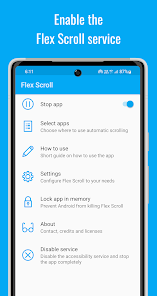
Flex Scroll will add a floating widget to the screen, featuring buttons for automatic scrolling: continuous scroll down / scroll up, page down / page up, and page right / page left. It also adds a slider in the margin, allowing you to conveniently adjust the auto scroll speed while scrolling.
Flex Scroll will also help you if you need to repeatedly scroll a full page: set a timer for the page scroll, and then conveniently adjust the timer interval using an on-screen slider. Have the timer reset each time you scroll a page yourself (optional).
What's more, Flex Scroll offers two speeds each for continuous scrolling down and up: normal speed, and a slow speed. Adjust these speeds to your liking, and then switch between a faster speed for browsing and a slower speed for reading at the press of a button!
Flex Scroll contains no ads.
The app's features:
★ Conveniently adjust the auto scroll speed using an on-screen slider
★ The currently selected scroll speed will be indicated in the margin
★ Option to have the speed selection slider fade after some seconds
★ Easily switch between a faster speed for browsing and a slower speed for reading using dedicated buttons
★ Jump to the top of the page at the press of a button
★ Scroll an entire page at the press of a button
★ Conveniently adjust the page size individually for each app using on-screen sliders
★ Start/stop a repeat timer for the page scrolling at the press of a button
★ Have the timer reset each time you scroll a page yourself
★ Conveniently adjust the page scroll timeout using an on-screen slider
★ Select the apps where you want the auto scroll widget to appear
★ In an app, the widget can be hidden in the margin and brought back via a swipe from the edge of the screen
This app uses the AccessibilityService API in order to implement its core functionality:
• to perform touch gestures in order to scroll the content of the screen
• to display a floating widget on top of other apps
• to determine which app is currently in the foreground
No data is collected via the accessibility service.
Flex: Multi-Speed Auto Scroll 使用排名
使用率排名基于 Similarweb 的算法,该算法会计算 28 天内的当前安装量和活跃用户数。
所有品类在
美国--
工具在
美国#7,061
用户兴趣点和热门类别
Flex: Multi-Speed Auto Scroll 用户使用的热门类别和应用程序
















 Flex: Multi-Speed Auto Scroll VS.
 四月 30, 2026