Newtag icon
Top Black Friday 2025 brands announced! What were the hottest products and categories?Download the report now 👉banner icon

12月8日的SD Card Test Pro应用程序分析

SD Card Test Pro

SD Card Test Pro

  • Zoltán Pallagi
  • Google Play 商店
  • 付费
  • 工具
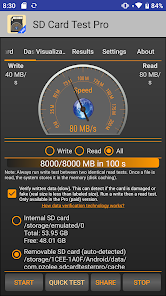
Use the best SD speed test tool! Test the speed of internal or external storage, sd card! Easy to use even for beginners. Quick tests. Highlighted features: ✔ Measure the speed of your external (removable) SD card ✔ Measure the speed of your internal storage ✔ Verify written data: damaged or fake card detection ✔ Read/write tests using several different combinations. ✔ Customized benchmarks ✔ Show storage type: eMMC, UFS 2.0 and 2.1 or higher ✔ Show class: Class 2, Class 4, Class 6, Class 10, UHS-I, UHS-II and UHS-III ✔ Detecting storage type and class ✔ Supporting several file systems like ext4, exFAT or FAT/FAT32. ✔ Support portable and adoptable storage as well ✔ Show storage details: free space, total space, mount options, device name Supported memory cards: * Basically any sd cards: Micro SD, SDHC and SDXC * built-in memory (card) Good to know: ✔ If the sd card is formatted as adoptable storage, the app may unable to access it directly. In that case either move the app to the adoptable storage (change the install storage), or format the storage as portable storage. How to use it: First select the storage type you want to test it. You can choose between internal or external storage. If the app could not detect any SD card, then it will display a "Storage cannot be detected" message, but you are still able to browse it manually (if there is sd card in your device). After you selected the storage type, choose between write and read test, but firstly always run a write test. On the first tab (Dashboard), you can see the speed on the speedometer while on the Visualization tab, you can check the current and average speed on the graph. After the test is finished, on the Results tab you can check the details like processed data, storage path, runtime or speed. Furthermore, here the app will detect the type of your internal storage (like eMMC or UFS version) and will detect the class for the SD card (like Class 10, UHS-I U1, V10). Important thing that the app will do these calculation based on the speed, thus it needs at least 4 GB of read or written data and at least 10 seconds of run time, otherwise the result can be misleading. Finally, you can share the results easily with one-button method. For professional people: In the Settings panel, you can adjust the size of the file(s) to read/write, you can change the number of the files (between 1-10). Good to know: ✔ if the sd card uses FAT/FAT32 file system, the maximum file size can be 4 GB, don't set it higher instead use more files. If you want to use bigger files, format the sd card to exFAT (mostly you can do it using a computer, and don't forget older mobiles do not support it). ✔ If the sd card is formatted as adoptable storage, the app may unable to access it directly. In that case either move the app to the adoptable storage (change the install storage), or format the storage as portable storage.
SD Card Test Pro

SD Card Test Pro 使用排名

使用率排名基于 Similarweb 的算法,该算法会计算 28 天内的当前安装量和活跃用户数。

所有品类在
美国#934
工具在
美国#162

每日活跃用户数量

查看SD Card Test Pro动态下载量和日常活跃用户,以便分析SD Card Test Pro用户的使用模式

用户

查看SD Card Test Pro动态下载量和日常活跃用户,以便分析SD Card Test Pro用户的使用模式

解锁每日活跃用户数
10月11月12月

动态SD Card Test Pro排名统计

SD Card Test Pro的 Similarweb 使用排名和Google Play 商店排名

使用排名
商店排名

排名

SD Card Test Pro按国家/地区排名

SD Card Test Pro在主要类别中排名最高的县


用户兴趣点和热门类别

SD Card Test Pro 用户使用的热门类别和应用程序

无数据可显示

顶级竞争对手和替代应用程序

同一商店内很有可能被同一批用户使用的应用程序。

1Tap Cleaner (clear cache)

1Tap Cleaner (clear cache)

AZSoft Technology Inc.

S3Drive: Cloud storage

S3Drive: Cloud storage

S3Drive

File manager

File manager

PlayersO

Storage Analyzer & Disk Usage

Storage Analyzer & Disk Usage

Mobile Infographics Tools

SD Card Test Pro VS.

十二月 8, 2025