

2月19日的SailTimer Wind Gauge™应用程序分析

SailTimer Wind Gauge™
- SailTimer Inc.
- Google Play 商店
- 免费
- 天气
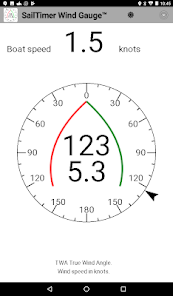
This app provides a visual wind gauge is a display for the wireless, solar-powered SailTimer Wind Instrument™. It also has a very handy audio feedback if you want to put your phone/tablet away to keep it safe, use a Bluetooth speaker and keep your hands and eyes free for sailing: see the description and 45-second YouTube demo at http://eepurl.com/dEGN7b
SailTimer Inc. made the first masthead anemometer for smartphones/tablets. See the many innovations of the newest SailTimer Wind Instrument™ at www.SailTimerWind.com. Because it is wireless, there are no wires to install down the mast. It is also small enough to use on boats of all sizes.
To use the SailTimer Wind Instrument™ with this Wind Gauge, first get the SailTimer API-WMM™ app in the Play Store. It receives the Bluetooth LE transmissions from the masthead, and reformats them for display in apps such as this one. Then just open this app, and once your GPS data is acquired, your wind conditions will be updating every second. (If the API is connected on Bluetooth but this Wind Gauge stays blank at first, make sure your phone has a view of the sky for the GPS satellites, then the Wind Gauge will start to work in about 2 minutes, after the GPS signal from the sky is acquired.)
This app includes a traditional wind angle display showing wind from 0-180 degrees on port or starboard. There is also wind direction on a standard compass display, in both Magnetic-North and True-North reference. Boat Speed is also displayed for a simple interface with the main parameters you want.
Both wind angle and direction can also now be displayed with (a) True wind speed and direction, like what is used on maps and in weather forecasts. Also with (b) Apparent wind speed and direction, which is what you feel when you are moving.
When this app is open your device will not put your display to sleep. You can turn the brightness up/down to save battery power with the sunburst icon at the top. If you turn off the screen, the API will maintain your Bluetooth connection in the background. When you turn on the device again, the Wind Gauge will still be displaying changes in wind speed and wind direction. If your Bluetooth connection is lost and then comes back again while the Wind Gauge is in use, the data should automatically reconnect.
The audio works when the screen is on or dimmed, but not off.
You can also use a smartwatch with this app. The Sony Smartwatch 3 is a good choice because it is waterproof, and has a reflective screen that is visible in direct sunlight. On a small sailboat where you may not have screens mounted on a binnacle or dashboard, just check the watch to see wind angle, wind direction, wind speed and boat speed. When the Wind Gauge app is in the foreground on the tablet/phone, whatever parameters you have on-screen are simultaneously displayed on the watch. Swipe to left on watch screen for Settings screen, with 5-second dim and brightness control.
End-User Licensing Agreement: www.wi-rb.com/AndroidEULA/Wind_Gauge_app_EULA.pdf
Have questions? There are How-To-Use pages and FAQs at http://www.SailTimerWind.com. If you have a question or feedback please email info@SailTimerInc.com. We’re here to help.
SailTimer Wind Gauge™ 使用排名
使用率排名基于 Similarweb 的算法,该算法会计算 28 天内的当前安装量和活跃用户数。
所有品类在
美国--
天气在
美国--


 SailTimer Wind Gauge™ VS.
 二月 19, 2026